
Table of Contents
GDPR vs CCPA vs DPDPA: Key Differences
Quick Comparison: GDPR vs CCPA vs DPDPA
The Principles Behind GDPR, CCPA, and DPDPA
How to Build a GDPR, CCPA, and DPDPA-Compliant Data Architecture
Handling Data Subject Rights (Without Breaking Your Systems)
Writing Secure Code (Where Privacy Meets Engineering Practice)
AI and Newer Tech: Where It Gets Genuinely Complicated
The Developer’s Guide to GDPR, CCPA & DPDPA Compliance
Data privacy used to be the legal team’s headache. Not anymore.
Over the last few years, many countries have introduced laws or regulations to protect people’s personal data. And this trend is continuing, with more countries creating or strengthening data protection rules. GDPR set the tone back in 2018. California followed with CCPA, then tightened things further with CPRA. And in 2025, India moved the DPDPA closer to practical implementation by introducing the detailed rules needed for organizations to understand and comply with the law, pulling over 1.4 billion people into a brand-new privacy regime.
What does that mean if you’re the one actually writing the code? It means privacy can’t be something that gets reviewed right before launch anymore. It has to live in the database schema, the consent pop-up, the deletion flow, the CI/CD pipeline and basically everywhere.
So instead of writing yet another “here’s what GDPR means” explainer, we wanted to share how we actually build this at Midnay. Real consent systems, real deletion pipelines, real AI compliance headaches, and the decisions we make when a client asks us to ship a feature that touches user data. Below, we’ll cover the key legal basics you need to know, along with the practical steps we take in our own projects.
GDPR vs CCPA vs DPDPA: Key Differences
You don’t need a law degree to build compliant software, but you do need to know how these three regimes actually differ. Because we treat them very differently on our projects, and assuming they’re interchangeable is where most teams get into trouble.
GDPR (EU, since May 2018)
GDPR (General Data Protection Regulation) applies to anyone processing EU/EEA residents’ data, no matter where your company is based. You need a valid legal reason for every piece of data you touch. High-risk processing needs a formal impact assessment, and if something goes wrong, you’ve got 72 hours to tell the regulator. Penalties can reach up to €20 million or 4% of the total worldwide annual turnover of the preceding financial year, whichever is higher.
CCPA / CPRA (California, since 2020, CPRA amendments effective from January 2023)
CCPA / CPRA (California Consumer Privacy Act / California Privacy Rights Act) applies to certain for-profit businesses that do business in California and meet at least one of these conditions.
- Revenue threshold: Gross annual revenue of $26.625 million or more for the preceding calendar year.
- Data-volume threshold: Buy, sell, or share the personal information of 100,000 or more California residents or households each year.
- Data-revenue threshold: Get 50% or more of annual revenue from selling or sharing California residents’ personal information.
Consumers get the right to know, delete, correct, and opt out of having their data sold. As of 2026, fines run up to $2,663 per unintentional violation and $7,988 per intentional one. So penalties can add up quickly.
DPDPA (India, enacted 2023; Rules notified November 2025)
DPDPA (Digital Personal Data Protection Act) works differently from GDPR. It doesn’t have a separate “legitimate interest” basis. Processing is generally based on consent or specific legitimate uses listed in the Act, including certain employment-related purposes. Data breaches must be reported without delay, with updated and detailed information generally due to the Board within 72 hours. Cross-border transfers are allowed unless the government restricts transfers to specific countries. Penalties for certain breaches can reach INR 250 crore. The DPDP Act’s core operational obligations including requirements around consent, security safeguards, breach notification and erasure are being brought into force in phases, with most of these provisions taking effect 18 months after the Rules were notified, on 13 May 2027.
Quick Comparison: GDPR vs CCPA vs DPDPA
| Features | GDPR | CCPA/CPRA | DPDPA |
| Lawful basis | 6 legal bases, including legitimate interest | Consent/opt-out rights vary by processing | Consent-first, no legitimate interest |
| Breach notification | 72 hours | requires notice without unreasonable delay | Notify without delay |
| Max penalty | €20M / 4% worldwide annual turnover (whichever is higher) | $7,988 per intentional violation, $2,663 per unintentional violation | Up to INR 250 crore for certain breaches |
| Cross-border transfers | Adequacy decisions or SCCs | No specific mechanism | Allowed by default, except where the government restricts transfers to specified countries |
The Principles Behind GDPR, CCPA, and DPDPA
Before getting into the how-to, it helps to have the underlying logic straight, because it’s the same logic across all three laws, just with different specifics bolted on.
- Privacy by design: Don’t start broad and lock things down later. Start from “collect nothing” and only add data collection where there’s a real, justified reason for it.
- Data minimization: The first question we ask ourselves on any new feature is: do we really need this information for the feature to work, or are we collecting it just in case? That single question is basically the whole principle in one sentence. The second question follows right after: do we actually have a valid reason to collect and use this information? The answer depends heavily on what the data is for. If the information is related to employees and HR work, DPDPA Section 7(i) may allow us to use it for certain business purposes without asking for consent. But if we’re collecting customer information for marketing, we need to be more careful. Clearly explain why we’re collecting the information, and where consent is required, get the user’s clear and separate consent.
- Accountability: It’s not enough to actually be compliant. We need to be able to prove it, on demand, months or years later.
- Security as part of privacy: Encryption, access control, and confidentiality aren’t separate from privacy work. Under all three laws, they’re the same requirement
With that groundwork in place, here’s what actually building this looks like on our projects.
How to Build a GDPR, CCPA, and DPDPA-Compliant Data Architecture
Before getting into each piece individually, here’s the full picture: how a single piece of personal data actually moves through the system, and which compliance consideration attaches to it at every stage.
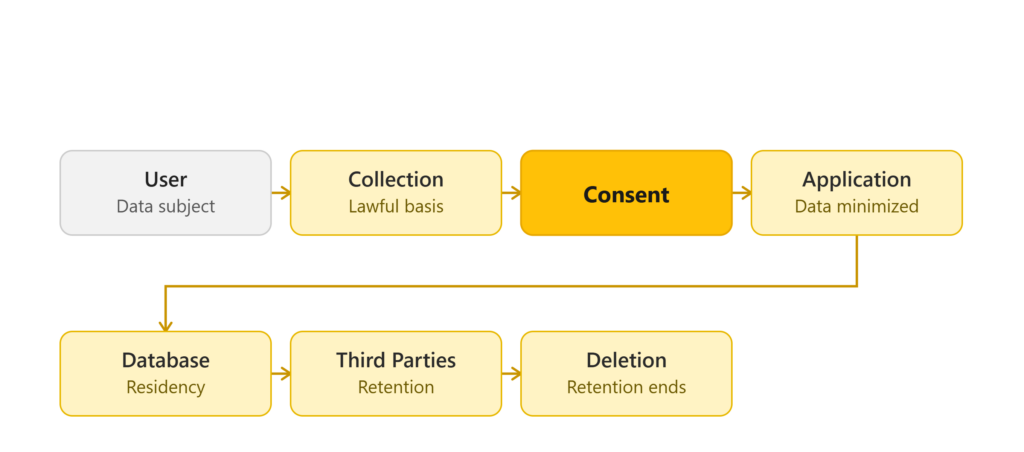
How to Map Personal Data Across Your Application
You can’t protect data you haven’t mapped. On our projects, this starts early during discovery, before a single feature gets built. During the project discovery phase, our Business Analysts prepare a Data Mapping Matrix to keep track of the personal information the application collects. It lists the different types of data, such as Name, Phone Number, IP Address, and Location. It also shows where the data is stored, which third-party tools like CRMs, analytics tools, or payment gateways receive it, and how long the data should be kept before it is deleted.
That matrix isn’t a one-time compliance checkbox for us. It becomes the reference document every future feature gets checked against, and it doubles as most of what regulators actually want to see in an audit.
How to Collect and Document Consent
Consent is a data model, a UI decision, and an audit trail at once. We use clear and separate consent pop-ups for different types of data or purposes. We don’t use pre-checked boxes or hide consent inside long Terms & Conditions. The user should clearly choose to give consent.
And every time someone says yes, we make sure that’s logged properly. Our backend records details such as the User ID, date and time, privacy notice version, and the specific options they agreed to. We also make sure users can withdraw their consent later through a simple and easy process.
Data Residency: Where Should Personal Data Be Stored?
Data residency decisions come down to where our client’s users are, and the two big regimes handle this almost oppositely. Under GDPR, moving EU user data outside the EEA comes with specific legal requirements to satisfy. Under DPDPA, it’s the reverse by default: data can generally be stored on cloud servers located in other countries, unless the government has placed restrictions on transferring data to a particular country.
In practice, that means the architecture decision follows the client’s risk tolerance. For projects with users from different regions, we usually look at using regional cloud databases. If the client has strict GDPR requirements or is a large enterprise, we may also consider setting up local database servers in specific regions to meet their data storage and compliance needs.
How to Set Data Retention and Deletion Rules
Not all data can be deleted on the same timeline; some of it has to legally stick around. That split, active data that can be removed on request versus data that must be legally retained, is really the backbone of how we handle deletion requests, and it drives everything in the next section.
Handling Data Subject Rights (Without Breaking Your Systems)
This is the part of compliance that actually touches your database design the most directly. Because “delete this person’s data” sounds simple until it has to happen across five databases, three third-party tools, and a pile of backups.
Actually deleting someone, everywhere
Our approach here is event-driven, and it splits into layers.
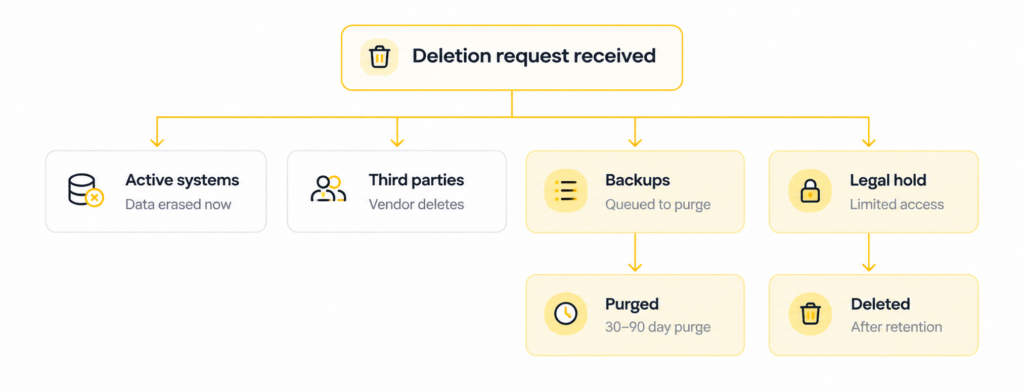
Active systems: when a user asks to delete their data, the system sends a deletion request with the User_ID to all connected systems. Each system then deletes the user’s data or replaces details like their name, email, and phone number with a value such as [DELETED_USER_12345].
Third-party tools: the same request gets fired off to whatever external tools are holding a copy. Services such as Salesforce, HubSpot, or Stripe using their data deletion features.
Backups are the trickiest part, because we usually can’t just reach in and edit them. Old backups are usually read-only, so we cannot always change them directly. Instead, we add the deleted User_ID to a deletion list. The backup is then kept until its normal expiry date, such as 30-90 days. If the backup needs to be restored before it expires, the system checks the deletion list and removes the user’s data before the backup is used again.
We also handle data differently depending on whether it needs to be kept for a period or not. Once a user requests deletion, we remove it immediately from the main site, search results, email lists, and marketing systems, anywhere it would still be visible or actionable day-to-day.
But some records genuinely can’t go that fast. Some records may need to be kept for legal, audit, or investigation reasons. These records are stored separately with limited access and are not used for normal business or marketing activities. Once the required period is over, the records are permanently deleted. That separation, active data vs. legally-retained data is really the key design decision underlying all of this for us.
Making sure it’s actually the user asking
Before any of that deletion machinery kicks off, there’s a simpler but easy-to-skip step: verifying it’s really the account owner making the request. A simple email from an unknown email address is not enough for us. Instead, we verify through something the user already controls, logging into their account, confirming an OTP sent to their registered contact info, or providing an existing customer or enrollment ID.
Letting users take their data elsewhere
Data portability sounds simple in theory. Hand someone their data so they can move it, but the execution matters. We add a “Download My Data” option in the settings. When a user selects it, the system collects all the personal data linked to their User_ID.
We provide it in two formats depending on what the user actually needs: JSON if they’re moving the data to another system, and CSV if they just want to open and read it in Excel.
And we don’t just email a file, that’s a security risk. Instead, the site creates a secure download link that works for 24-48 hours. The link is available inside the user’s logged-in account, and the user may need to verify their identity again using an OTP before downloading the data. Portability, in other words, gets the same identity-verification rigor as deletion.
When AI makes the decision, not a human
If a client site uses automatic pricing (like WooCommerce dynamic pricing rules), membership scoring, or personalized product recommendations, we give users an option to turn these features off from their account settings entirely.
But the bigger issue is what happens when an automated decision actually affects someone in a meaningful way. If an automated system makes an important decision, such as rejecting an application or reducing a credit limit, we provide a “Request Human Review” option, in line with GDPR Article 22, which gives users the right to obtain human review of automated decisions. The user can see a simple reason for the decision and ask the support team to check it again.
This is also where age comes in. Under DPDPA Section 9(3), certain types of tracking, targeted ads, and profiling of children under 18 are restricted, and if the site identifies a user as under 18, these features are turned off. (Separately, DPDPA Section 9(1) requires verifiable parental or guardian consent before processing a child’s data at all, which we cover more in the AI section below.)
Writing Secure Code (Where Privacy Meets Engineering Practice)
The baseline checklist
DPDPA Rule 6 sets out reasonable security safeguards that Data Fiduciaries must implement, including encryption, access controls, and logging, with logs and personal data required to be retained for at least one year unless a longer period is required by law. For us this comes down to a short list of habits we follow on every project:
- Data at rest gets encrypted with AES-256 in the database.
- Data in transit uses TLS 1.3 between the site and the client’s servers.
- Access is scoped: our developers only get access to what their work actually requires.
- Error logs are cleaned so personal details like names, emails, and phone numbers never show up in them.
Vetting third-party tools before they touch your data
Every new library, SDK, or analytics tool is a potential new place user data can leak out through. Before using any third-party or analytics tools in a project, we first check how they handle user data. We check if the tool sends data to other servers, where those servers are located, and whether the company has a Data Processing Agreement (DPA) to protect user data. If a tool collects user data without clearly telling users, or if it does not meet our security needs, we do not use it in the project.
Tracking who changed what
None of the above matters much if you can’t tell who touched what code, or when. We use Git to keep track of all code changes. Developers cannot directly change the live system. We can see who made each change, when it was made, and what was changed.
Before any code that touches user data goes live, it follows a review chain rather than a single developer’s judgment: the developer checks it, and then it’s tested by QA specifically to find security problems, exposed passwords, or personal information showing up in logs. And we never test with the real thing. We use separate testing systems with dummy data. We never use real user data from the live system for testing or development.
Testing it like someone’s trying to break in
Beyond code review, every release goes through dedicated security testing. We use security tools to check the test version of the website before it is released, looking specifically at problems with user login, API access, and other security issues.
For anything bigger, a major feature or a new website handling personal data, the bar goes up further. We test it for security problems, checking things like data protection, user access, and API security. And this isn’t a soft gate. A feature that uses user data will not be released if serious security problems are found. The problems must be fixed and checked by the technical lead before the feature goes live.
Catching leaks before they become incidents
Even with good intentions, personal data still finds its way into places it shouldn’t. Usually through crash logs. When a website crashes, the error logs may sometimes contain private information, such as passwords, phone numbers, or payment details. Rather than relying on developers to remember to scrub things manually, we use filters that catch sensitive patterns and replace them with [REDACTED] or *** before logs ever get saved.
AI and Newer Tech: Where It Gets Genuinely Complicated
Deleting data out of AI systems
When a website uses an AI chatbot or AI-driven recommendation plugin, user conversations and behavioral data sometimes get stored in ways that don’t behave like a normal WordPress database table. Particularly if the plugin sends data to a third-party AI service or stores it in a vector database for search/recommendation purposes. Our approach is to design for this upfront rather than trying to retrofit it later. We make sure any such data is tagged to a user’s ID wherever possible, so it can be identified and removed on request rather than sitting untouched in a system we didn’t originally account for.
Keeping private data out of AI API calls
Any time a plugin or integration sends website data to an external AI service, a chatbot calling OpenAI, an AI writing assistant, an AI search plugin, there’s a real risk of quietly shipping personal data along with it. Where possible, we use a filtering step between the site and the external AI service so personal details like names, phone numbers, and email addresses aren’t passed along unnecessarily. Just as important is the paperwork behind it. We check the plugin or vendor’s data processing terms to confirm user data isn’t being used to train their public AI models.
AI personalization and kids
As mentioned earlier, DPDPA Section 9(3) restricts tracking, targeted advertising, and profiling of anyone under 18. On top of that, Section 9(1) requires verifiable consent from a parent or guardian before processing a child’s personal data in the first place, which is the bigger build requirement in practice. If a website uses AI or plugins to recommend content or personalize the experience, we first check the user’s age where that data is available. If the user is under 18, we turn off features like tracking, profiling, and personalized recommendations, and processing their data at all depends on that verified parental consent being in place.
Monitoring, Logging & Incident Response
Spotting trouble early
We use server monitoring tools to find unusual data downloads, unknown logins, and other suspicious activity. When something does happen, the clock starts immediately: if a data breach happens on a client system managed by Midnay, our internal policy says that we must inform the client within 4 to 12 hours. This gives the client enough time to inform the Data Protection Board and the affected users and complete any required reporting within the required time.
Keeping debugging logs clean without losing visibility
You need enough logs to troubleshoot problems, but you also don’t want personal data ending up in them. We handle this by keeping Application Logs and System Access Logs separate.
| Features | Application Logs | System Access Logs |
| Used by | Developers, to find and fix problems | Security team, to monitor for threats |
| Captures | Debugging data, error traces | IP addresses, timestamps, HTTP response codes |
| Personal data | Automatically stripped out | Never stores what users type into forms |
| Purpose | Troubleshooting and bug fixes | Security monitoring and audit trail |
| Retention | Kept for at least 1 year under Rule 6 | Kept for at least 1 year under Rule 6 |
The Practical Checklist
If we were training a new developer joining our team, here’s exactly what we’d tell them:
- Collect only what’s needed. Don’t grab extra data just because it might be useful someday.
- Protect it properly, both ways. AES-256 for data at rest, TLS 1.3 for data in transit, and make sure passwords, emails, and phone numbers never end up in error logs.
- Get consent right and log it. Separate, specific consent pop-ups, no pre-checked boxes, and a proper audit trail of who agreed to what and when.
- Verify identity before acting on a request. Deletion, correction, and data-download requests all need the same identity checks before you touch anything.
- Plan for deletion from day one. Design the database so user data can actually be removed when requested, and keep any legally-required records separate, access-limited, and on a defined deletion timeline.
- Vet every third-party tool. Check where data goes, whether a DPA exists, and whether it’s used to train external AI models before it touches your project.
- Lock down database access. Never share the main database password, and only give access to people who genuinely need it for their work.
What Privacy Compliance Means for Developers
DPDPA alone proves privacy regulation isn’t settling into one global standard, and more countries are drafting similar laws every year. So “compliance” is an ongoing engineering discipline built to onboard the next jurisdiction without a redesign.
The teams that handle this well are the ones where privacy decisions happen at the schema level, the API contract level, and the CI/CD pipeline level, long before anything reaches a legal review.
If there’s one habit worth taking from this, it’s the question we open every feature with: do we actually need this data, or are we just collecting it because we can?
If you’re looking for a development partner who builds privacy compliance into every stage: data collection, consent, storage, and deletion, rather than treating it as an afterthought, get in touch with Midnay and let’s build it right the first time.

Swetha B Chandran
Product Team LeadSwetha B Chandran, with more than 10 years of professional expertise, is a highly adept and skilled developer specialized in WordPress and WooCommerce. Her capabilities span creating engaging websites, designing themes, developing plugins, and effectively implementing them. With an additional 7 years of experience as a team lead, she adeptly guides and coordinates teams to achieve seamless project objectives.

Leave a Reply
Articles
Related Insights.
Blogs and Resources on WordPress, WooCommerce, SEO and Marketing


Leave a
Comment.