
WooCommerce Subscriptions: The Easy Way to Manage Recurring Payments
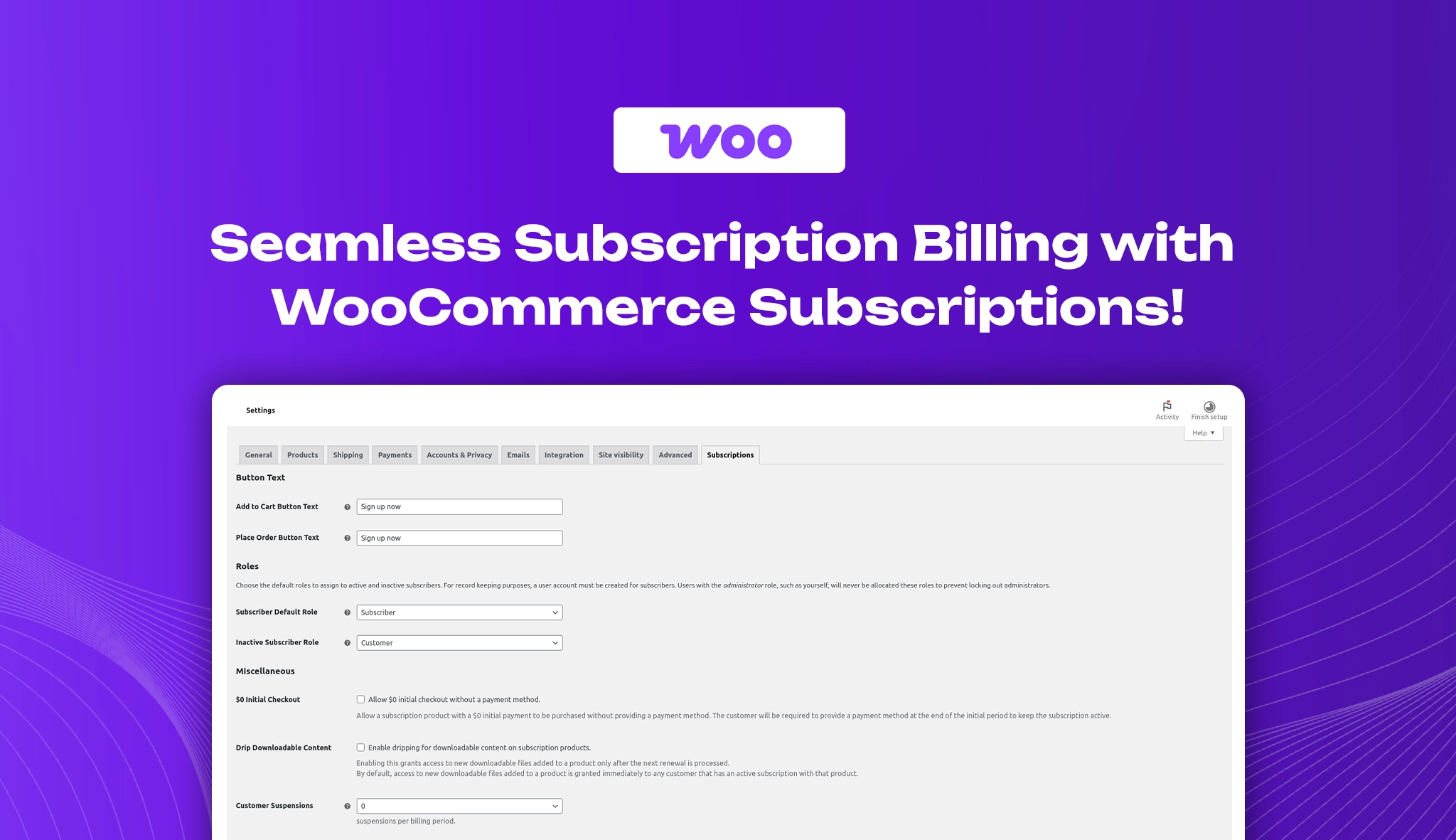
Efficient subscription management is essential for WooCommerce-powered eCommerce businesses offering recurring products and services. WooCommerce Subscriptions, a premium plugin by WooCommerce, streamlines the process by automating payments, managing renewals, and enhancing customer retention. Seamless integration enables store owners to effortlessly implement and scale recurring revenue models, making it a must-have for subscription-based businesses.
Key Compatibility & Performance Stats
- Plugin Name: WooCommerce Subscriptions
- Category: eCommerce, Subscription Management
- Compatibility: Works with WooCommerce; requires PHP 7.2+ and WordPress 5.0+
- Pricing: Premium ($239/year for a single site license)
- Active Installations: More than 90,000 active installations.
- Ratings & Reviews: WooCommerce Subscriptions has a 2.9-star rating. Users like its flexibility but have some issues with usability and support.
WooCommerce Subscriptions Admin Dashboard Overview
The WooCommerce Subscriptions settings dashboard provides a streamlined interface for managing and customizing subscription options. With flexible controls, store owners can efficiently handle recurring payments, renewals, and customer subscriptions, ensuring a seamless experience for both businesses and subscribers.

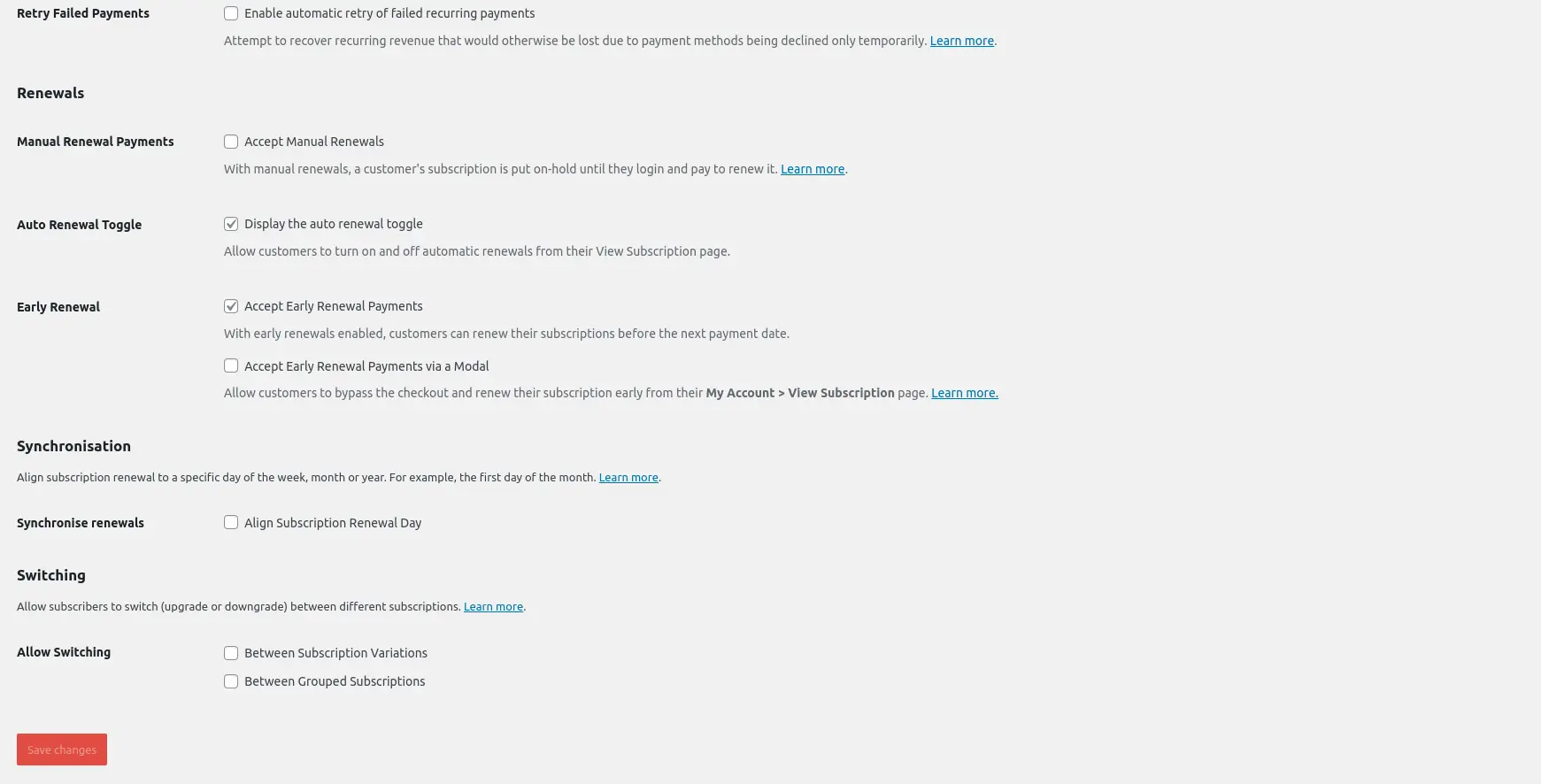
Below are the key settings available in the WooCommerce Subscriptions dashboard.
Button text settings
The button text settings allow you to customize the “Add to Cart” and “Place Order” buttons to reflect subscription-based purchases better. Changing the text to “Sign Up Now” clarifies that users are enrolling in a recurring plan rather than making a one-time purchase. This adjustment enhances the user experience, reduces confusion, and boosts conversion rates by aligning the call-to-action with the subscription model. Customizing button text ensures a seamless checkout process, making it easier for customers to confidently commit to their subscriptions.

Role settings
The Role Settings allow you to define user roles for both active and inactive subscribers. The Subscriber Default Role assigns a specific role (e.g., “Subscriber”) to users with an active subscription, ensuring they have the correct access and permissions. The Inactive Subscriber Role assigns a different role (e.g., “Customer”) when a subscription expires or is paused, helping manage user privileges efficiently. Administrators are never assigned these roles to prevent access issues.

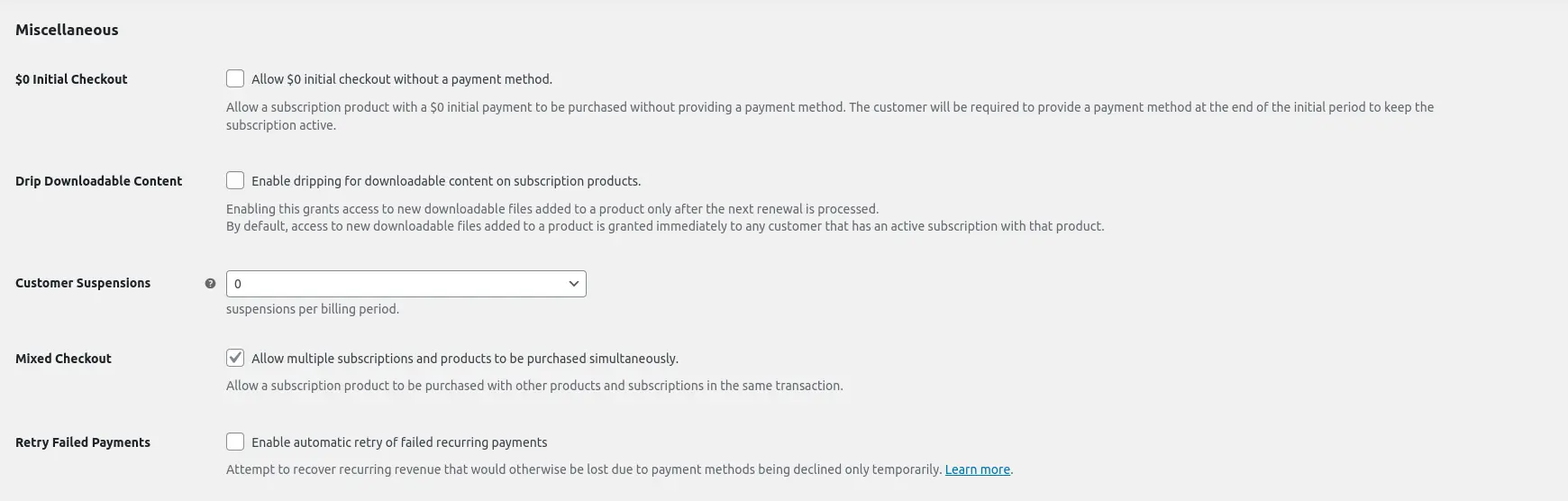
Miscellaneous settings
The Miscellaneous Settings provide flexibility in managing subscriptions. You can enable $0 Initial Checkout, allowing customers to start a subscription without an immediate payment. Drip Downloadable Content controls when new files become accessible. Customer Suspensions set limits on how often subscribers can pause their plan. Mixed Checkout allows subscriptions and other products to be purchased together. Retry Failed Payments helps recover revenue by automatically retrying declined recurring payments.
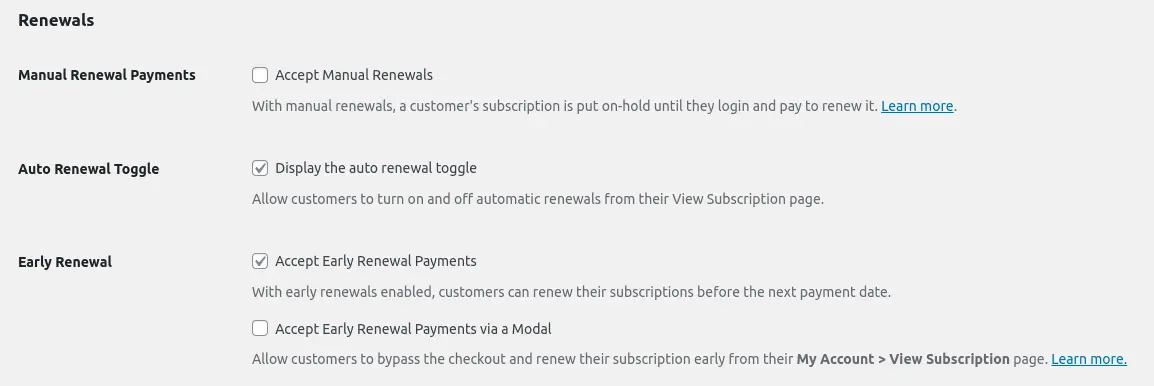
Renewals settings
The Renewals Settings lets you manage how subscription payments are processed. You can enable Manual Renewal Payments, requiring customers to log in and pay for renewals manually, or Turn Off Automatic Payments to prevent new subscriptions from auto-renewing. The Auto-Renewal Toggle allows customers to control their renewal preferences from their account. Early Renewal options let customers renew before their next billing date, with an additional Modal Option for a seamless renewal process.
Synchronized Renewals Settings
The Synchronized Renewals feature lets you align all subscription renewals to a specific day of the week, month, or year. This helps standardize billing cycles, making payment management easier while enhancing the customer experience.

Switch Settings
The Switching feature lets customers upgrade, downgrade, or switch between subscription plans. This flexibility enhances the customer experience by giving them more control over their subscriptions.

Key Features to Consider
- Trial Periods & One-Time Sign-Up Fees: Allow customers to experience your subscription services before committing to customizable free trials. Additionally, charge a one-time sign-up fee to cover setup costs or initial expenses, giving you full control over pricing strategies.
- Customizable Subscription Plans: Create flexible subscription models with different billing intervals, pricing structures, and product variations. Whether it’s weekly, monthly, or yearly, tailor your subscriptions to meet customer preferences.
- Comprehensive Subscription Management: Easily manage all aspects of your subscriptions, including modifying pricing, adjusting billing schedules, pausing, canceling, or resuming subscriptions as needed. Gain complete control over your recurring revenue streams.
- Subscriber Self-Management: Empower customers with the ability to manage their subscriptions from their account dashboard. They can update billing details, switch plans, cancel subscriptions, or change payment methods without manual intervention.
- Aligned Billing Cycles: Synchronize subscription renewals to a specific day of the week, month, or year to streamline billing processes. This feature ensures consistency in cash flow while offering customers a more predictable renewal schedule.
- Plan Switching (Upgrades & Downgrades): Offer subscribers the flexibility to upgrade, downgrade, or switch between different subscription plans with automatic proration of payments. This makes it easier for customers to adjust their subscriptions as their needs change.
- Flexible Product Subscription Options: Enable subscriptions for digital, physical, or service-based products with customizable renewal frequencies. Whether you sell software licenses, membership plans, or physical deliveries, this feature adapts to your business model.
- Bundled & Multiple Subscription Support: Allow customers to purchase multiple subscriptions in a single checkout process. Whether they subscribe to different products or services, all renewals can be managed efficiently under one account.
- Subscription Coupons: Increase conversions and retain customers with subscription-specific discount coupons. Offer promotions on sign-up fees or recurring payments to incentivize long-term subscriptions.
- Automated Customer Email Notifications: Keep customers informed with automated email notifications for upcoming renewals, payment confirmations, and subscription updates. This feature enhances transparency and improves customer engagement.
Pricing
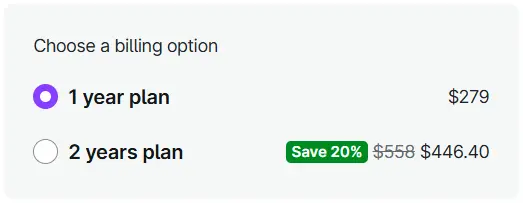
WooCommerce Subscriptions offers flexible pricing to suit different business needs. Check out the latest pricing and find the best plan for you on the WooCommerce subscriptions page.
Pros and Cons
Pros
- Supports multiple subscription types (simple & variable)
- Works with major payment gateways
- Provides customer self-service options
- Offers trial periods & sign-up fees
- Easy integration with other WooCommerce extensions
Cons
- No free version is available
- Some advanced features require additional plugins (e.g., WooCommerce Memberships for content restriction)
- Limited reporting options (third-party plugins needed for advanced insights)
Performance & Optimization Insights
The subscription system is designed for performance, but incorrect configurations may lead to slowdowns.
Best Practices:
- Use caching plugins carefully to avoid interfering with subscription renewals.
- Choose a reliable hosting provider with WooCommerce optimization.
- Enable WooCommerce Analytics for better tracking of subscription revenue.
Best Use Cases
- eCommerce Stores selling subscription-based products (e.g., monthly boxes, coffee subscriptions).
- Online Learning Platforms offering recurring courses or memberships.
- Software Providers running SaaS businesses with monthly/annual plans.
- Service-based businesses provide recurring billing for coaching, support, or maintenance.
Alternative Plugins
YITH WooCommerce Subscription: The YITH WooCommerce Subscription plugin lets you create and manage recurring payments for products and services in your WooCommerce store. It supports flexible billing cycles, automatic renewals, and multiple payment gateways, helping you generate steady, passive revenue effortlessly.
Paid memberships pro: Paid Memberships Pro is a powerful WordPress plugin for managing memberships, subscriptions, and gated content. It offers flexible payment options, member management, and integrations to help businesses, nonprofits, and creators monetize their websites.
WP simple pay: WP Simple Pay is a lightweight WordPress plugin that enables seamless Stripe payments without the need for complex setups or coding. Ideal for businesses and nonprofits, it simplifies one-time and recurring payments with customizable forms and a user-friendly interface.
WooCommerce Subscriptions by WebToffee: The WooCommerce Subscriptions plugin by WebToffee simplifies recurring payments and subscription management in your WooCommerce store. It offers flexible billing, automated renewals, and seamless payment gateway integration. With features like free trials, prorated billing, and advanced subscriber management, it helps businesses build a scalable subscription model.
Final Thoughts & Recommendation
The WooCommerce Subscription plugin by WooCommerce is an excellent choice for businesses implementing recurring payments and subscription models. While it requires an upfront investment, its robust features, and seamless WooCommerce integration make it a top-tier choice for serious eCommerce entrepreneurs.
If your business relies on repeat customers and long-term relationships, this plugin is worth the investment.
Download & Learn More
Get started with WooCommerce Subscriptions and unlock powerful recurring payment features for your store. Stay in control with flexible billing, automated renewals, and seamless integration.

Leave a Reply
Articles
Related Insights.
Blogs and Resources on WordPress, WooCommerce, SEO and Marketing

Leave a
Comment.