
WPForms Review: Simplifying Form Building for WordPress Users
One of the most crucial tasks for any WordPress website is creating interactive and user-friendly forms, as they play a major role in collecting customer feedback, lead generation, payment processing, and executing surveys. Due to the use of traditional form builders, most website owners find them too complicated and time-consuming, with limited functionalities.
This is where WPForms comes in with its drag-and-drop interface with the most advanced features, like AI-powered tools, conditional logic, marketing, and payment integrations, making it the ultimate form builder for both beginners and experts.
In this review, we will examine how it streamlines form creation along with the flexible tools to adapt to every website requirement.
Plugin Overview
- Plugin Name: WPForms
- Category: Form Builder
- Compatibility: Works with most WordPress versions; recommended PHP 7.4+; WooCommerce supported.
- Pricing: Free basic version named WPForms Lite; premium plans start at $49/year.
- Active Installations: Over 6 million users globally.
- Ratings & Reviews: Consistently rated above 4.8 stars from over 13000 WordPress reviews.
Dashboard Overview
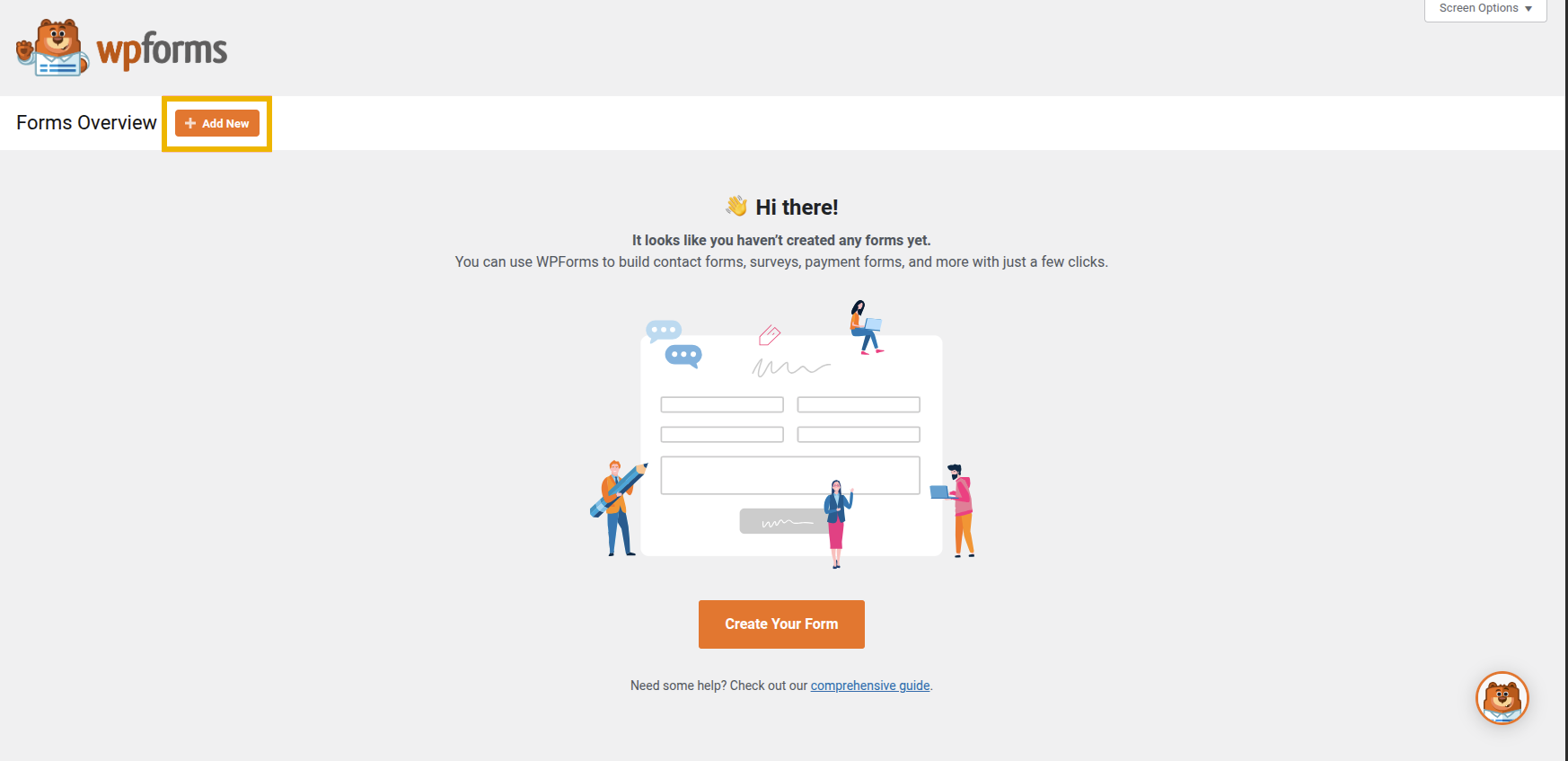
The dashboard gives you a complete and straightforward view of how you can manage all your forms, along with the options to create new forms or view the existing ones.
Form Creation
1. Form Template Selection
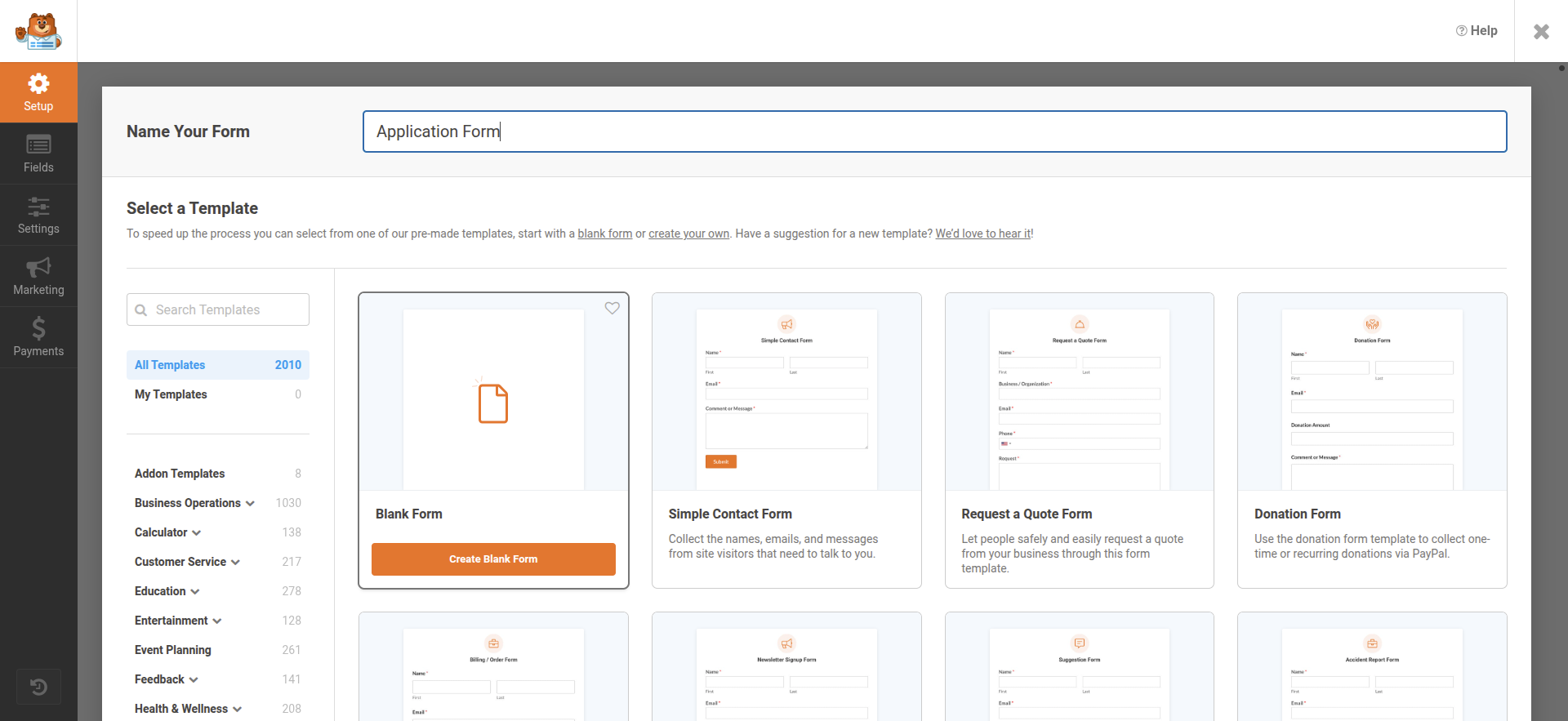
To get started quickly, the template section offers a number of prebuilt templates. You can access the templates either by browsing among the available templates or using the search bar for a quick start on the templates.
In addition to prebuilt templates, there are other options to create forms:
- Blank Form Template: The blank form template uses the drag-and-drop builder to create forms from scratch and hence provides you with complete control over each field and layout.
- Generate with AI: If your objective is to generate forms quickly without starting from scratch, then Generate with AI is the best option for accessing Generate with AI. Click ‘add new’ and ‘generate with AI’ while hovering over the form builder.
These options make it easier to create responsive and expert forms according to the specific requirements.
2. Field Customization
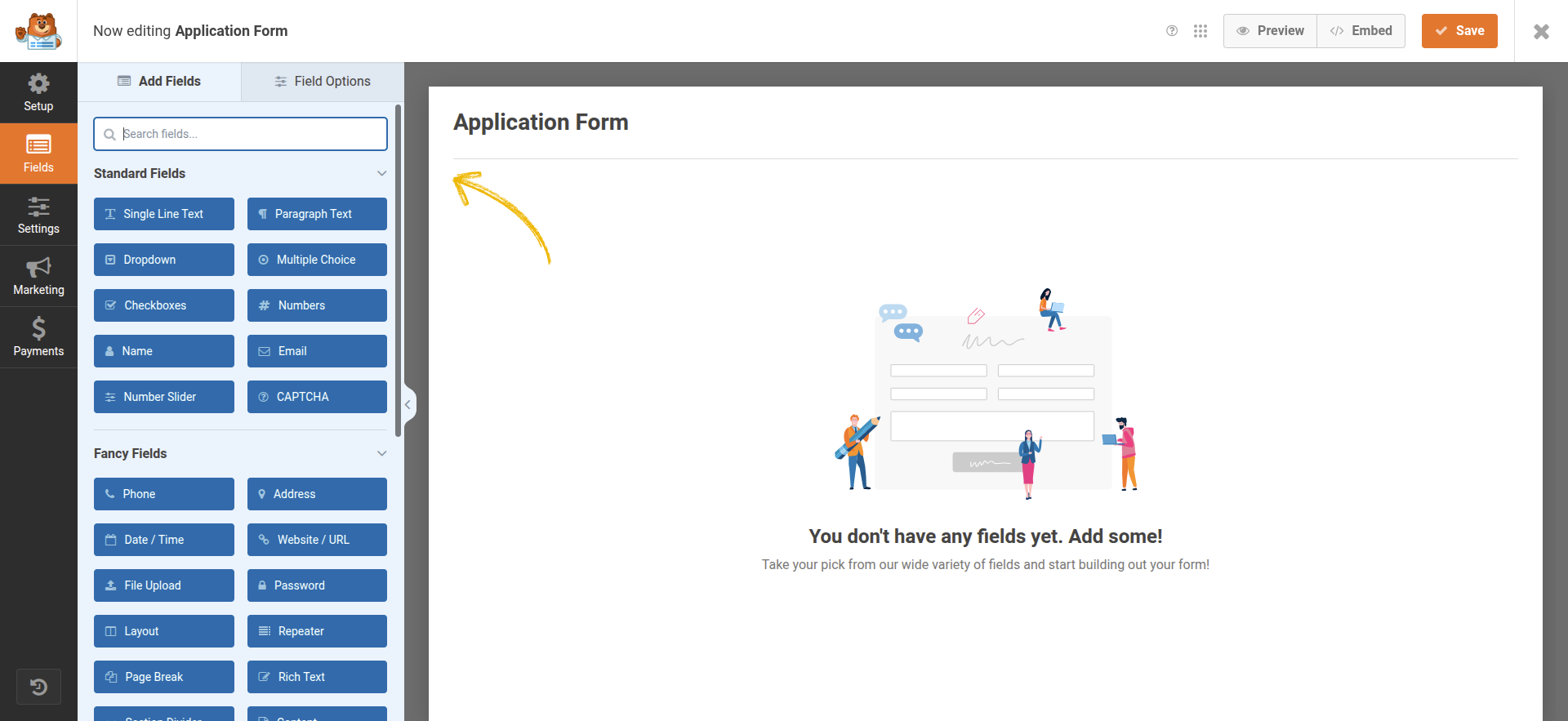
After choosing a form template, you will be redirected to a field screen panel where all the available fields are shown according to the chosen template. The licence level plays a major role in which fields you see. For example, the screenshots provided mainly highlight two types of fields: ‘standard’ and ‘fancy’. The standard fields are included in the basic plan, while the fancy fields vary depending on the selected plan.
primarily offers two ways to add fields to your form.
- By using the left-hand panel to access the required fields.
- By simply dragging and dropping the necessary fields into the preview of the form.
The user-friendly interface makes it easier to design and customize forms according to specific requirements.
3. Form Customization
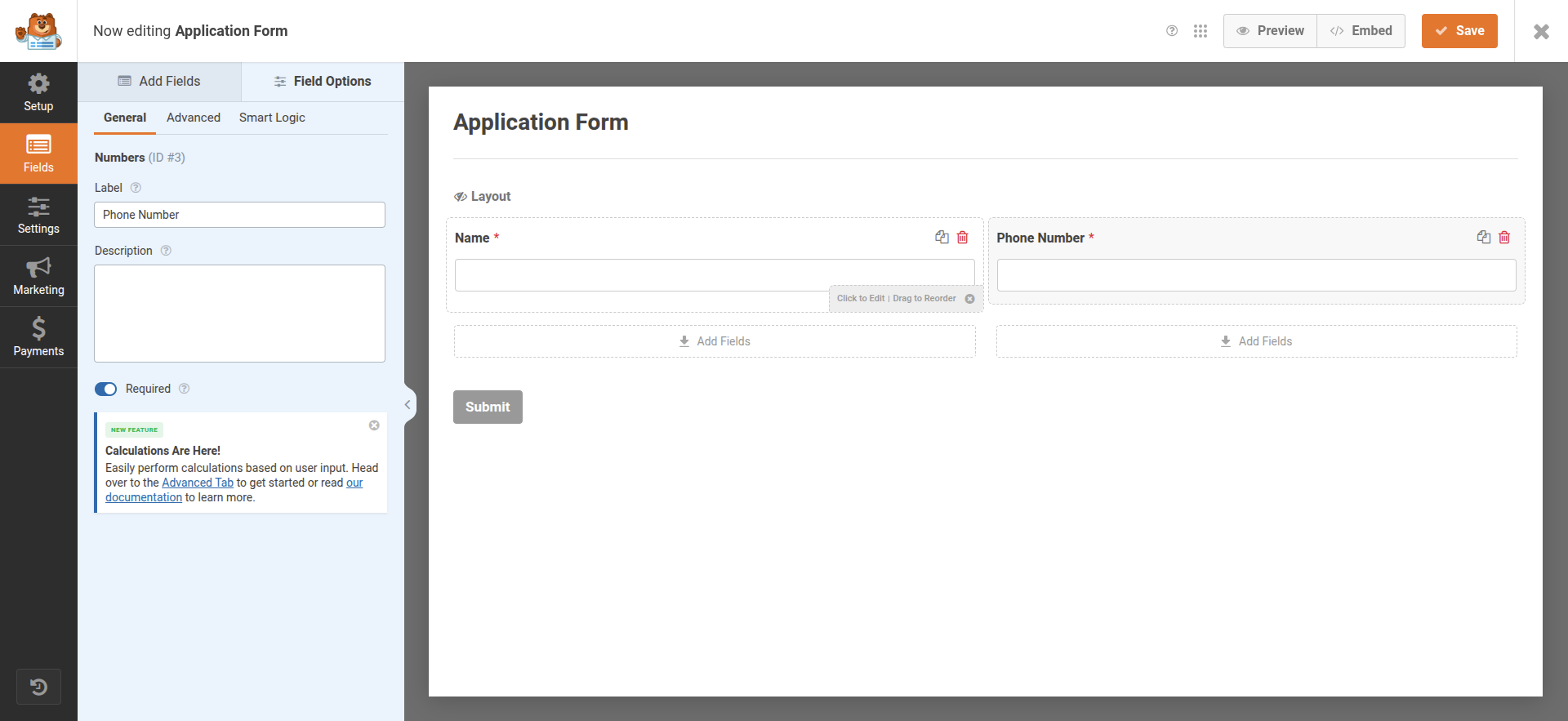
Each form field can be completely customised. By using the drag-and-drop builder interface, you can change labels and descriptions quite easily according to your specific field requirements. It’s easy to develop responsive forms without any coding, and the changes can be instantly displayed in the live preview.
4. General Settings
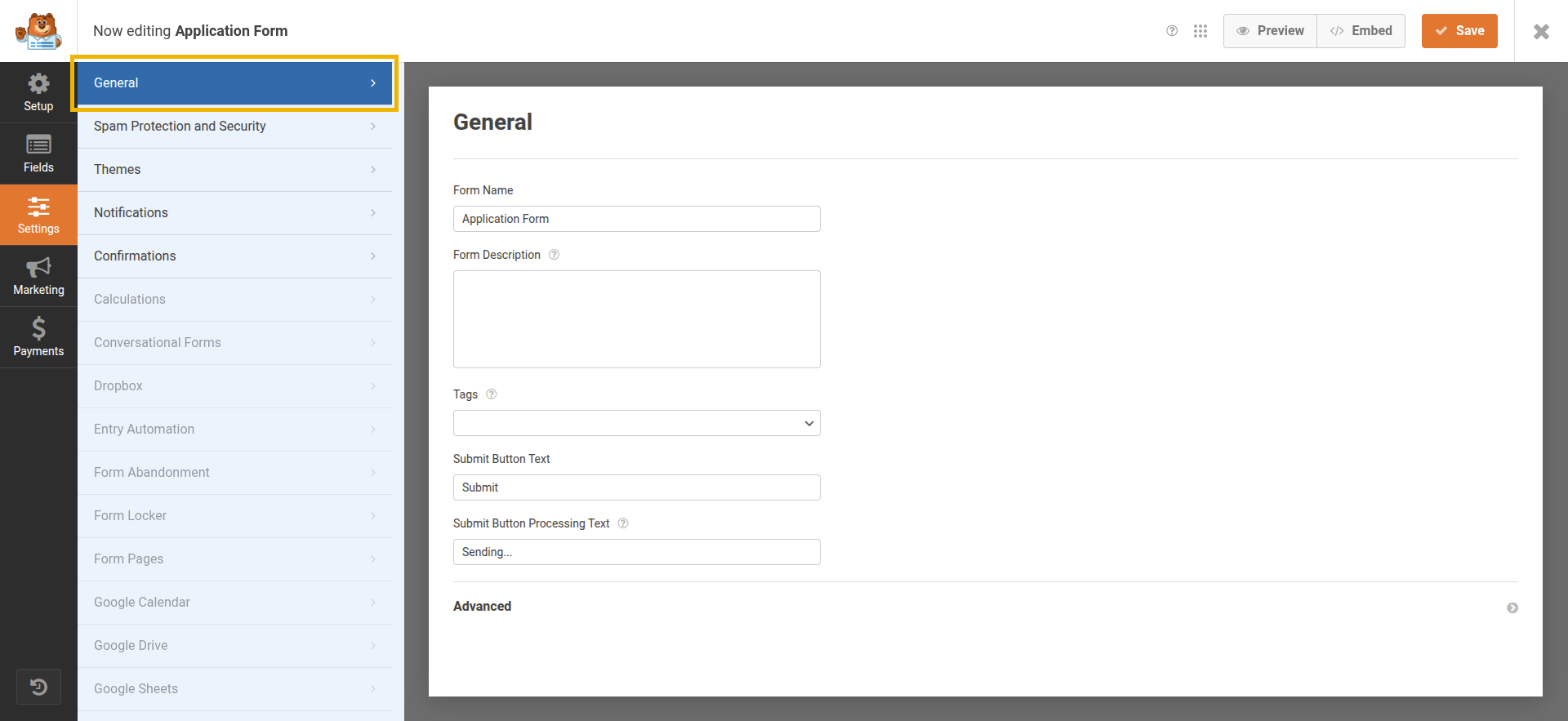
As the screenshot represents, the general settings’ primary objective is to provide options to alter the form’s name and description and tags for convenient organization, along with options to alter the submit button’s behaviour and text. By expanding the advanced section, experienced users can apply custom CSS to style for their unique needs. This degree of customization is advised for those who are familiar with CSS.
5. Form Spam Protection and Security

Anti-spam filters, Akismet integration, and minimum submission time limitations are some of the tools used in the spam protection and security area to guard against spam and harmful submissions.It also supports country- or keyword-based restrictions and advanced CAPTCHA choices (such as Google reCAPTCHA, hCaptcha, Cloudflare Turnstile, etc.). These combined measures provide more control to administrators over who can submit forms.
6. Notifications
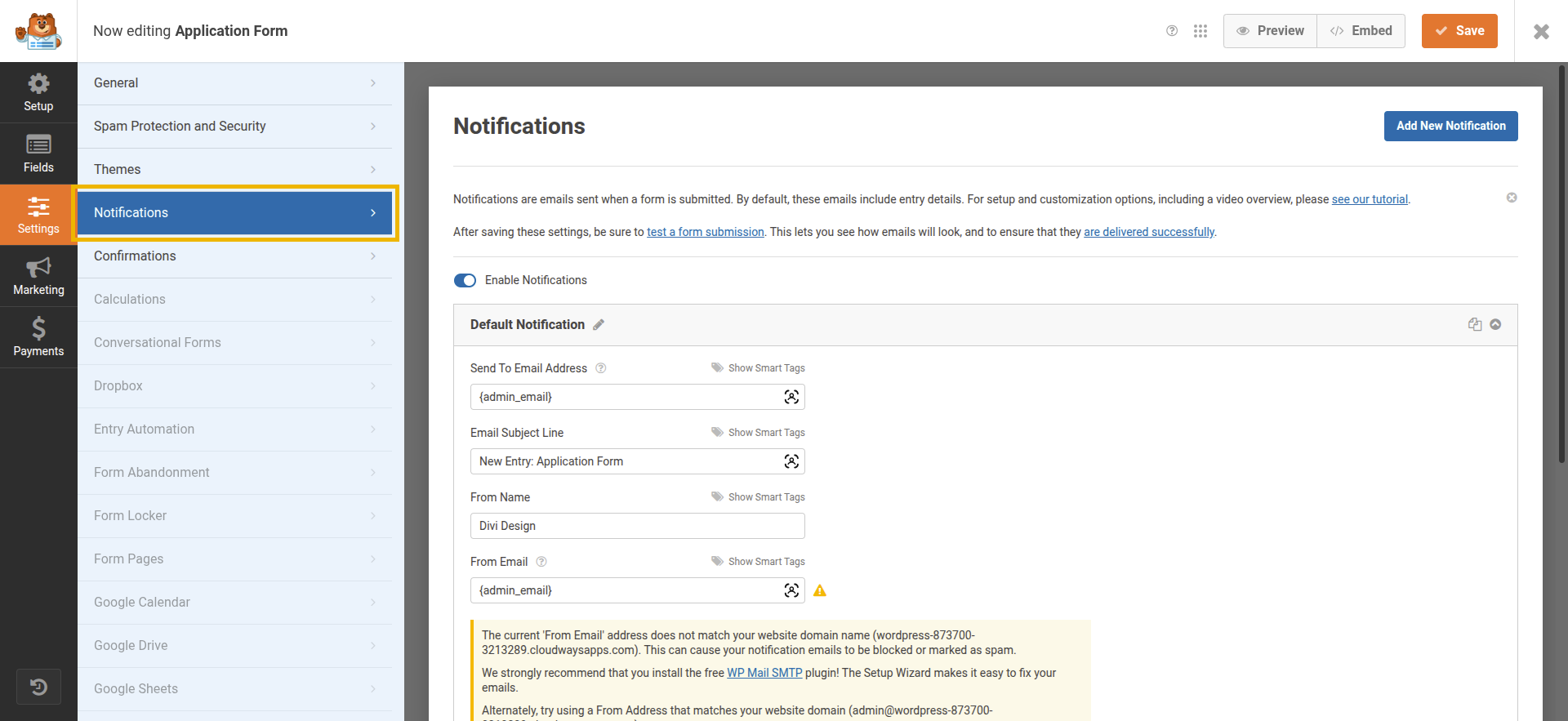
The notifications guarantee automated email alerts soon after successful form submissions with smart tags for dynamic data; they also provide customization options for recipients, subject lines, and sender information.
7. Confirmations
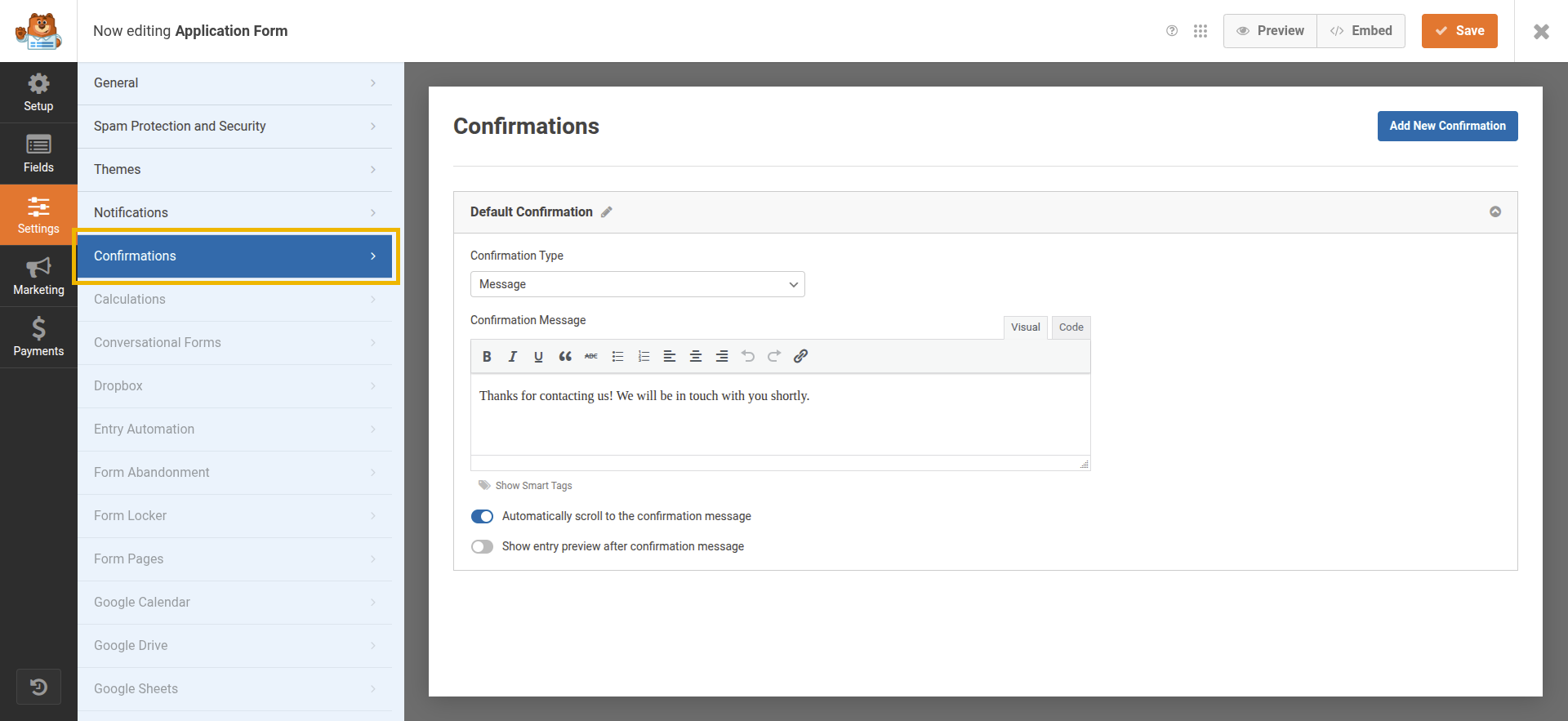
The “Confirmations” section in the application form settings allows administrators to set up immediate feedback messages for users after form submission, enhancing communication and user experience. The default confirmation type is a message, which can be customized using a visual editor to thank users and inform them that a follow-up will occur soon. Additional options let the system automatically scroll to the confirmation message or display an entry preview after submission, ensuring users are reassured and clearly informed about their successful interaction with the form.
8. Displaying Forms on Your Site
There are mainly two ways to add forms to the website:
Using the Block Editor
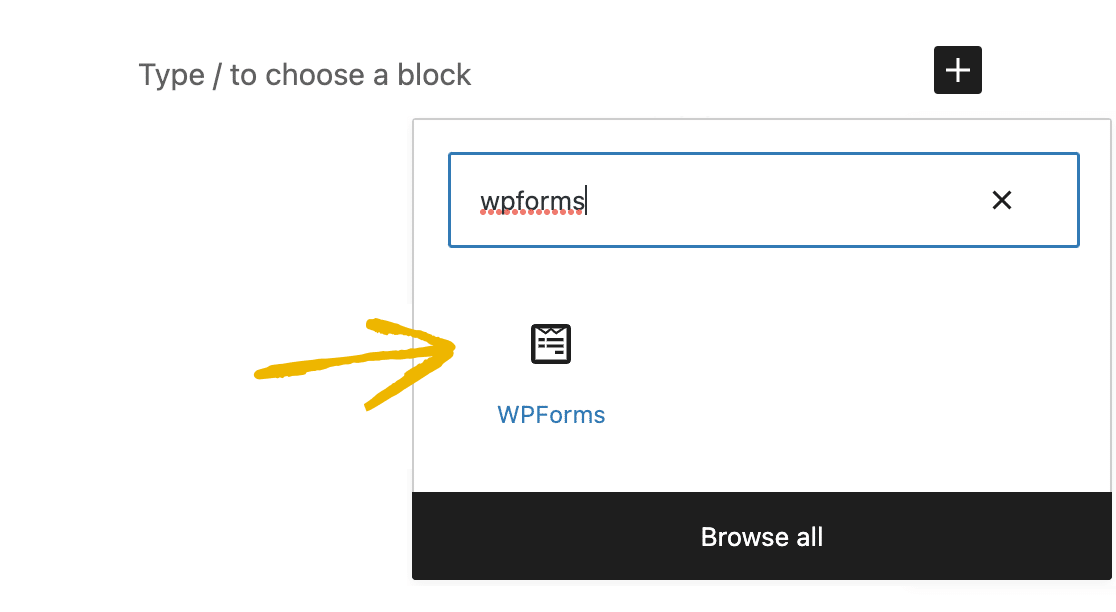
Using the block editor, you can easily add forms to the desired location of web pages. The process is simple: open the page, click on the ‘+’ icon where you want to place the form, select the WPForms block, choose the form from the dropdown, and update the page to make it visible.
Using the Embed Button

The process of embedding the form is also straightforward; after you are done with the customization on the form, you can click the embed button to easily insert and display it in the desired locations you are looking for.
Key Features
- Drag-and-Drop Builder: The plugin comes up with an easy-to-use drag-and-drop interface that creates custom forms in a matter of a few clicks without any knowledge of coding.
- Ready-to-Use Form Templates: The form builder plugin offers a wide range of pre-designed templates according to your requirements, such as forms for collecting contact details, registrations, surveys, and more, along with the option to customize the templates to your requirements.
- Mobile friendliness forms: In today’s digital era, most users access digital platforms through mobile devices, so it’s important to keep your forms mobile optimized. With relation to our form builder, no separate mobile forms are required because the forms will adapt to any device, regardless of screen size, automatically.
- AI-Powered Form Assistance: AI-powered form assistance significantly simplifies complex form setups by utilizing AI to generate and optimize forms according to specific requirements. It also provides suggestions for labels, layouts, and field types, which makes the form creation process much more straightforward.
- Dynamic Field Logic: Dynamic field logic helps in building personalized forms; conditional logic makes the forms better and more user-oriented, and also reduces clutter, resulting in better completion rates.
- Instant Submission Alerts: The feature provides you with real-time alerts each time a user submits a form, which keeps everything updated and responds according to that. The notifications can be modified to include certain recipients or form information.
- Repeatable fields: Repeatable fields are highly beneficial if you want your users to submit forms with multiple sets of data. It makes complicated data collections easier for site owners, such as eliminating repetitive tasks like adding multiple contact items or orders.
- Step-by-Step Forms: As the name suggests, it treats long forms as multiple-page formats with progress indicators to help users navigate through the procedure, resulting in higher form completion rates.
- Built-in Anti-Spam Measures: The plugin comes up with built-in anti-spam measures such as CAPTCHA, honeypot fields, and other anti-spam tools, which reduce unwanted entries and preserve useful data without interfering with the user’s experience.
- Connect with Marketing & Payment Tools: The plugin provides a range of integrations with well-known payment gateways and email marketing tools, enabling the collection of payments, subscriptions, and leads without the need for additional plugins.
Visit the page for detailed information about the features and add-ons of WPForms.
Pricing
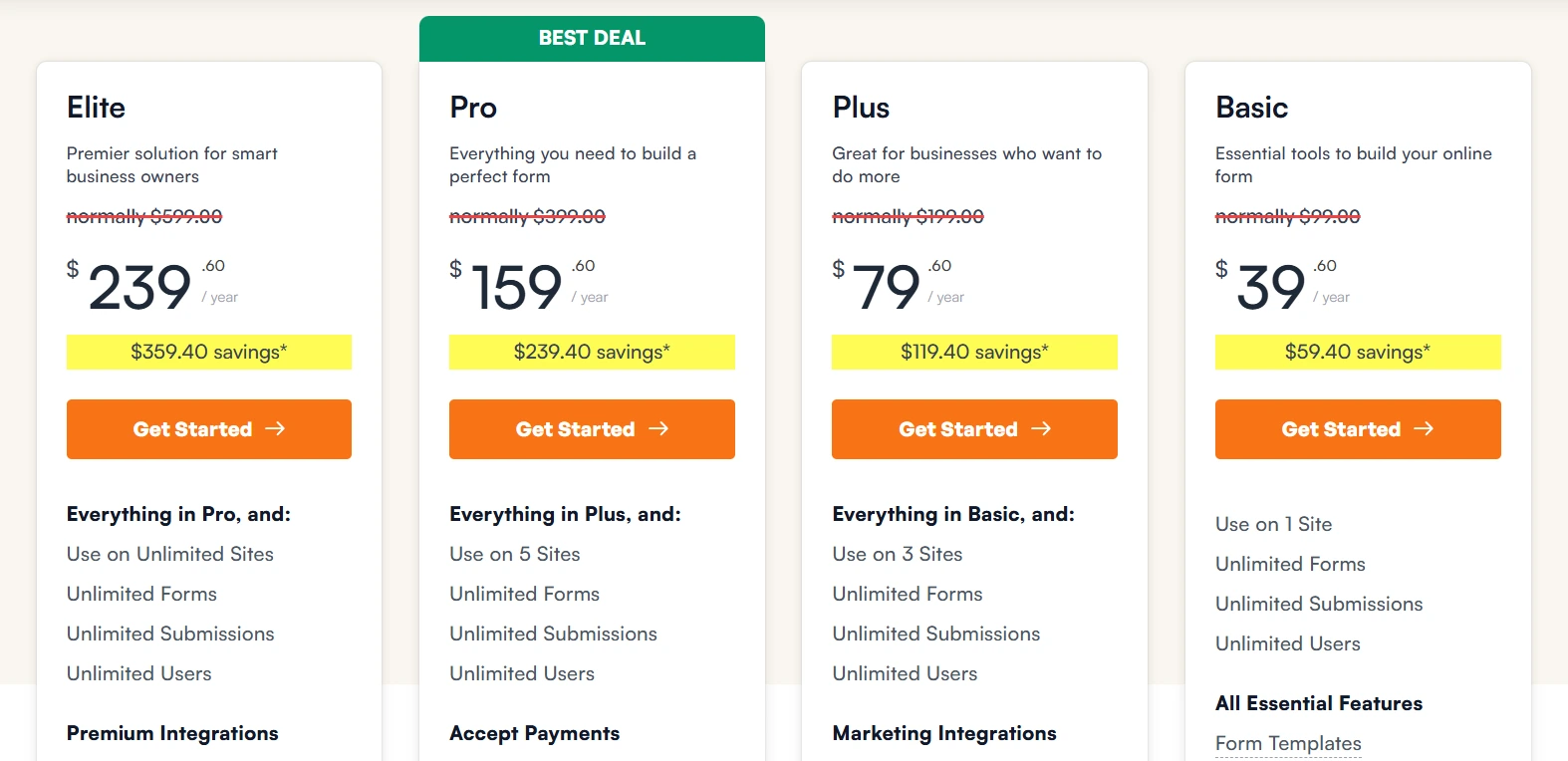
Four pricing tiers are available for the plugin: basic, plus, pro, and elite.
For detailed information regarding each pricing plan and its features, please visit the pricing page.
Pros and Cons
Pros:
- Beginner-friendly user interface
- Scalable and adaptable to various business requirements.
- Provides integrations with major marketing tools and payment gateways.
- Provides regular updates and active support
Cons:
- Higher-tier plans are needed for accessing advanced functionalities.
- The free version comes with limited templates and integrations.
Performance & Optimization Insights
WPForms is a performance-oriented WordPress plugin that loads effectively without affecting the speed of the overall website. For optimal performance:
- Look to load scripts only on pages containing forms.
- Avoid adding multiple add-ons at once.
- Websites that experience higher traffic should implement optimized caching and hosting plugins.
Best Use Cases
- Agencies: Agencies can utilize the plugin for building forms for their clients.
- Bloggers & Content Creators: Bloggers and content creators can utilize it for collecting feedback, leads, and subscriptions.
- eCommerce Stores: The plugin is highly suitable and adaptive for e-commerce stores because it helps in acquiring customer orders and feedback.
- Non-profits & Events: Non-profits and businesses managing events make use of these plugins in managing donations, volunteer sign-ups, and registrations.
Alternative Plugins
- Gravity Forms: Comes up with advanced levels of customization, perfect for complex form setups.
- Formidable Forms: An excellent choice for consulting complex forms that include displaying data or calculations.
- Fluent Forms: Fluent Forms comes up with advanced integrations and automations for building fast and user-friendly forms.
Final Thoughts & Recommendation
WPForms is a highly dependable and user-friendly form builder, and it’s considered one of the popular choices among WordPress users due to its easy-to-use drag-and-drop interface, a wide number of top-rated integrations, and performance optimization.
It is a worthwhile investment if you are looking for a plugin that is a complete mix between ease of use and functionality, particularly for those who wish to expand their forms according to their business expansion.
Download & Learn More
Build and manage forms effortlessly with a user-friendly drag-and-drop builder that simplifies every step.
Start using WPForms to create, customize, and secure your forms with ease and flexibility.

Leave a Reply
Articles
Related Insights.
Blogs and Resources on WordPress, WooCommerce, SEO and Marketing


Leave a
Comment.