
WordPress Security in 2026: The Complete Checklist to Lock Down Your Site
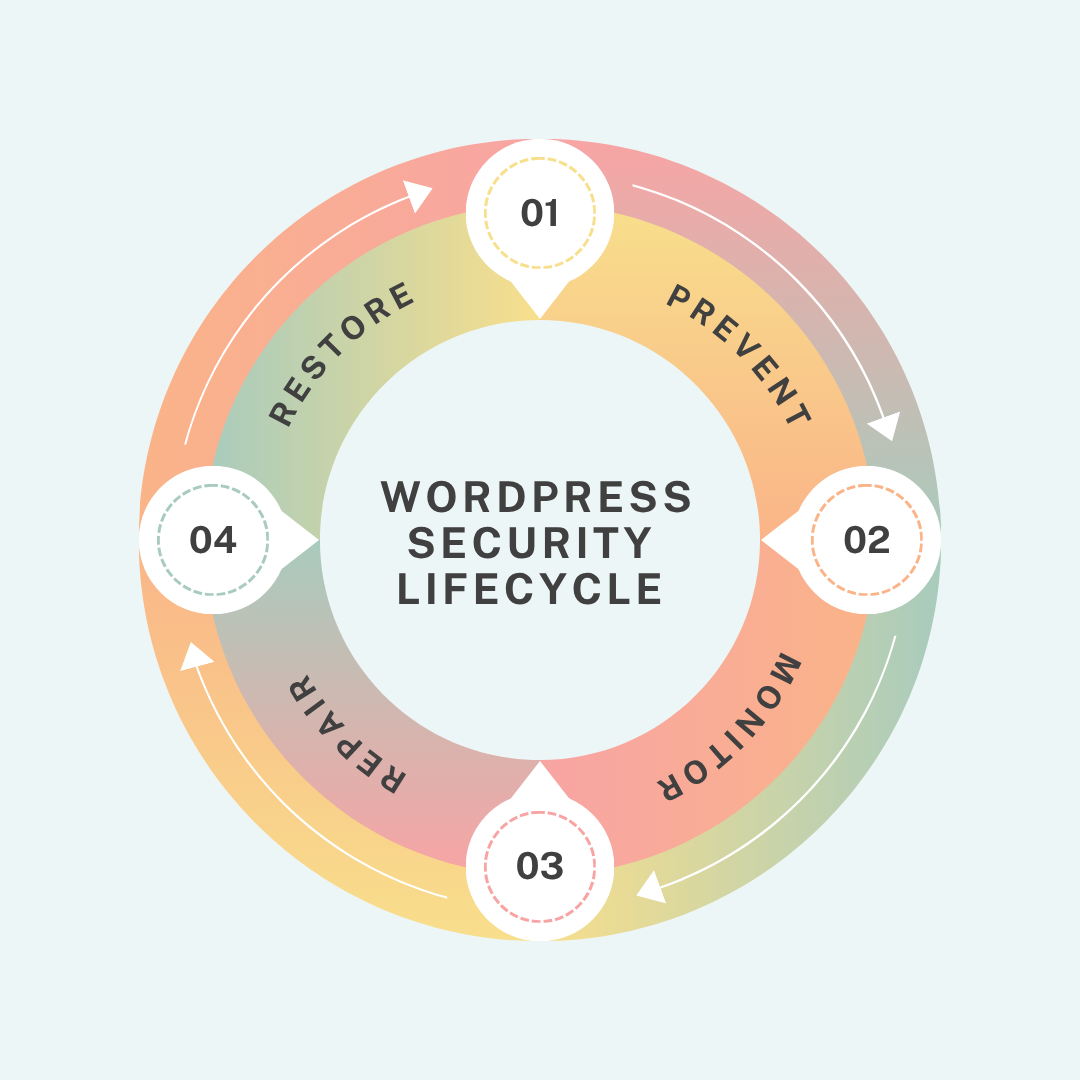
After years of cleaning hacked WordPress installations, recovering compromised servers, and hardening vulnerable websites, our approach to WordPress security in 2026 has become remarkably clear. Every effective security strategy comes down to a precise framework of four core principles:
Prevent – Monitor – Repair – Restore.
Every firewall rule, backup policy, malware scan, access restriction, and recovery workflow fits somewhere inside that framework. And if there’s one lesson experience keeps reinforcing, it’s Preventing an attack is always cheaper, faster, and less damaging than recovering from one. Every single time.
Every security decision we make maps to one of four stages and they run in a loop, not a line.
Stage 1: Prevent
Since prevention is better than cure, it’s important that we concentrate on this step before everything.
1. Secure User Accounts and Administrator Access
Remove Default Usernames and Weak Passwords: When we onboard a new client site, the credential audit always comes first. The number of sites we’ve inherited with an active “admin” username and weak, easily guessable passwords is still staggering.
Automated attack tools repeatedly try large volumes of default usernames and common passwords, relying on sheer repetition until they find a match. So the first things we address are always the same, remove the default “admin” username and enforce strong, unique passwords on every account, especially admin and editor level. Reused passwords from other services are one data breach away from becoming your problem.
Enforce Two-Factor Authentication (2FA): Enable two-factor authentication on all admin accounts without exception. Login protection without 2FA is half a lock on a door.
Audit User Roles and Remove Unused Accounts: Every unnecessary admin account is an unnecessary risk. Give users only the access they actually need, nothing more. Remove inactive accounts entirely.
2. Harden the WordPress Login Page Against Brute Force Attacks
Change the Default WordPress Login URL: The default WordPress login URL – /wp-login.php – is publicly known and constantly targeted by automated attacks. We change it on every site we manage. Moving the login page to a non-standard URL immediately reduces a large volume of automated traffic before it becomes a risk.
Limit Failed Login Attempts and Lock Suspicious IPs: We set a strict limit of 3 to 5 failed login attempts before an IP address is temporarily locked out. This prevents repeated guessing attempts and significantly reduces the effectiveness of automated login abuse.
Combine Rate Limiting with 2FA for Stronger Protection: When rate limiting is combined with two-factor authentication, brute force attacks become practically ineffective. Each measure alone helps, but together they create a much stronger barrier that prevents unauthorized access even under sustained attack attempts.
Here is a comparison table contrasting a poorly secured site vs. a hardened site across the above credentials for a quick review.
| Setting | Unsecured Site | Hardened Site |
| Username | admin | Custom, non-guessable |
| Password | Reused/weak | Unique, 20+ chars |
| 2FA | Off | Enforced on all admins |
| Login URL | /wp-login.php | Custom path |
| Failed attempts | Unlimited | Locked after 3–5 |
3. Keep WordPress Core, Plugins, and Themes Updated
Outdated Plugins Remain the Main WordPress Risk: Outdated plugins and themes are the single largest source of WordPress vulnerabilities year after year. This is not a periodic issue; it requires ongoing attention. We update WordPress core, themes, and plugins on a weekly cadence for every site we manage. Delaying updates beyond that simply extends the window of exposure.
WordPress powers ~43% of the web. There are ~500 million+ indexed sites. Even if only 30% run WordPress and only 20% are negligently maintained, that is tens of millions of exposed sites at any given moment. Useful for framing why automated attack tools exist – they are fishing in a large pond.
Enable Automatic Security Updates for WordPress Core: For WordPress core, we enable automatic background updates in wp-config.php. Minor security releases should not depend on manual intervention, by the time they are applied manually, known vulnerabilities may already be actively exploited.
Remove Unused and Abandoned Plugins Completely: Any plugin or theme that is not actively in use should be deleted, not just deactivated. Deactivated files still exist on the server and can still be exploited if a vulnerability is present. We also review plugins for abandoned projects, and anything that has not been updated by its developer in over a year is treated as high risk.
4. Apply Server-Level and Configuration Hardening
Protect wp-config.php and Sensitive Files: Your wp-config.php file contains database credentials and security keys, and it should never be publicly accessible. Restricting access at the server level is non-negotiable.
Disable XML-RPC and Dashboard File Editing: XML-RPC is a legacy remote access endpoint that is often exploited for brute force attacks and DDoS amplification, so we disable it on most sites. We also disable file editing from the WordPress dashboard, as allowing direct theme or plugin edits from the admin panel creates an unnecessary risk if an account is compromised.
Fix Unsafe File Permissions and Directory Browsing: File permission misconfigurations are a common but overlooked vulnerability. Directory browsing, when enabled, exposes the structure of the server and should always be disabled.
Add Essential Security Headers: Security headers such as Content Security Policy, X-Frame-Options, and X-Content-Type-Options help reduce client-side attack vectors and can be implemented without additional cost.
Hide WordPress Version Information: We remove the WordPress version number from both page source and HTTP headers to avoid exposing version details to potential attackers scanning for known vulnerabilities.
Enforce HTTPS Across the Entire Site: HTTPS must be enforced across the entire site, including redirects and mixed content handling, to ensure all traffic is securely encrypted without exceptions.
5. Strengthen Infrastructure with Secure Hosting and a WAF
Managed WordPress Hosting Matters: The foundation starts at the hosting level. We recommend managed WordPress hosting for all client sites managed hosts handle server-level hardening, automatic patching, and environment security in ways that shared generic hosting simply doesn’t match. It’s one of the highest-leverage infrastructure decisions a site owner can make, and it’s often overlooked.
Filter Malicious Traffic with a Web Application Firewall: A Web Application Firewall sits in front of your site and filters malicious traffic before it reaches WordPress. Combined with IP whitelisting on the login page and rate limiting on authentication attempts, it eliminates the vast majority of automated attack traffic.
Layered Security Architecture: Midnay uses a multi-layered security model that combines Cloudflare at the DNS and edge layer along with Midnay Security Central plugin at the application layer.
Here is how those layers stack and why each one matters:
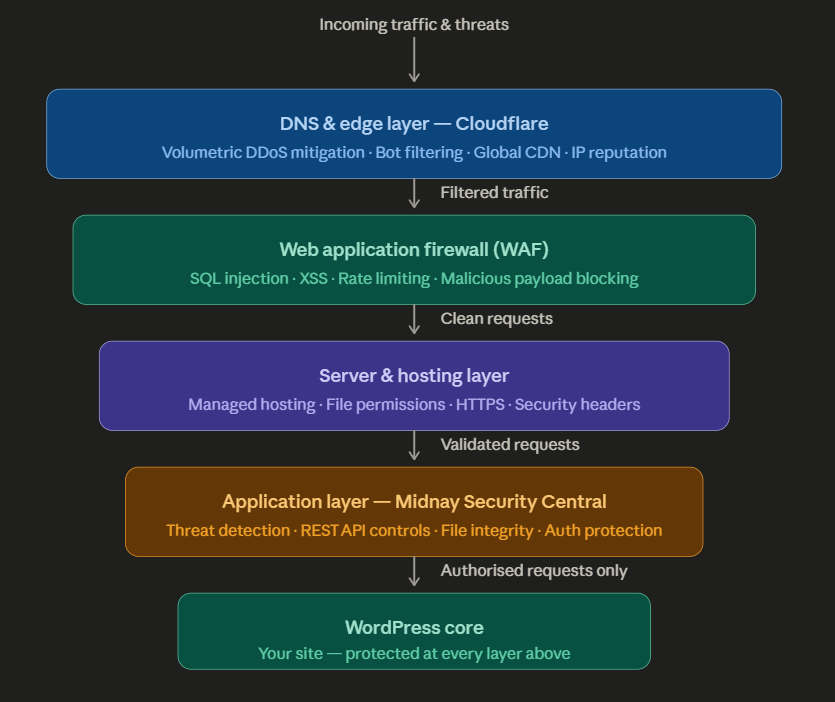
As you can see in the diagram, each layer gets narrower than the one above it, reinforcing that threats get progressively filtered before anything reaches WordPress core.
DNS & Edge-Level Protection: Cloudflare at the DNS level handles volumetric attacks and bot filtering at the edge before traffic reaches the server.
Application-Level Security: Midnay Security Central provides deeper application-level protection tailored specifically for WordPress environments.
Midnay Security Central Manages:
- WordPress-specific threat detection
- REST API access controls
- XML-RPC restrictions
- File integrity monitoring
- Malware and suspicious activity detection
- Authentication and admin-area protections
This layer secures the website application itself and protects against platform-specific attacks.
Stage 2: Monitor
Hardening a site is not a permanent state. New vulnerabilities are disclosed constantly. A plugin that was safe last month may have a critical CVE published today. Without monitoring, you won’t know until something breaks or someone else tells you.
1.Activity logging : Tracks every significant event on the site logins, failed login attempts, admin changes, plugin activations, file modifications, user role changes. When something goes wrong, the activity log is the first place we look. It turns a mystery into a timeline. Midnay Security Central’s activity log gives us filterable, exportable records with configurable alerting, so we know about anomalies before they escalate.
2.File integrity monitoring : Watches core WordPress files and flags any unexpected changes. Malware injections frequently modify core files or add files to locations they should never appear. Automated integrity checks catch this early, before the damage compounds.
3.Email alerts : Configured on every site we manage – triggered by logins, failed login attempts, and file changes. Monitoring is only useful if someone actually gets notified. You shouldn’t have to remember to log in and check; the site should tell you when something needs attention.
4.Security scoring and scanning : Gives a regular snapshot of the site’s security posture flagging failed checks, misconfigured settings, and newly introduced risks from recent changes. We run these as part of our retainer monitoring cadence and share the results with clients so they understand exactly what they’re paying for.
5.Vulnerability disclosure feeds : Staying informed about newly disclosed vulnerabilities in WordPress core, plugins, and themes means we can act on a disclosure before an exploit is actively deployed in the wild. This is where monitoring transitions directly into prevention.
Stage 3: Repair
Despite best efforts, breaches happen. A zero-day vulnerability, a compromised third-party service, a credential stolen from somewhere else entirely , no security posture is impenetrable. What matters then is how quickly and completely you can respond.
We’ve recovered sites from brute force takeovers, malware injections, backdoor installations, and SEO spam attacks. The pattern is consistent: the sites that recover fastest and most completely are those with the best pre-breach preparation- clean backups, a documented environment, and an activity log that makes it possible to trace exactly what happened and when.
When we’re brought in to handle a compromised site, the response follows a clear three-step sequence.
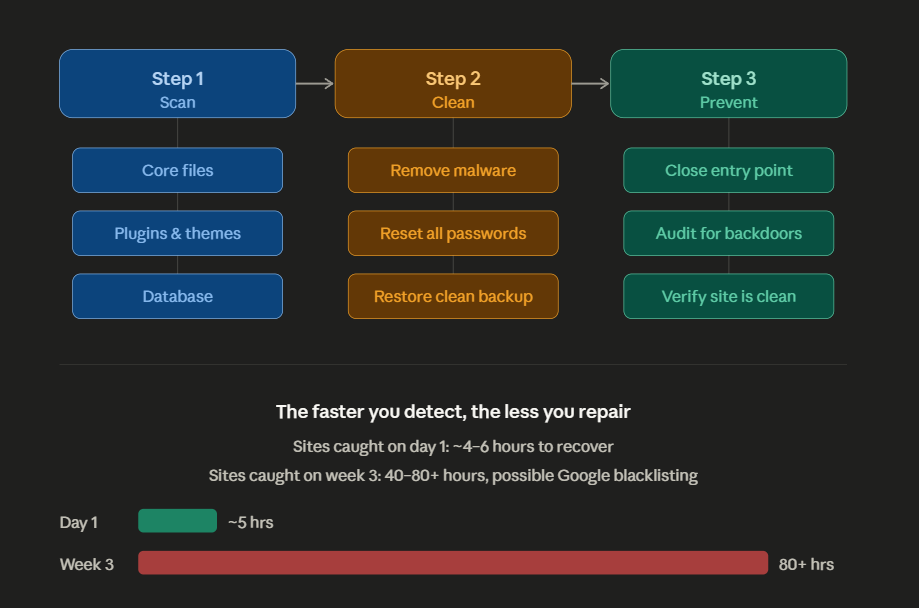
Step 1: Scan
We begin by identifying the full scope of the compromise. We run malware scanners across:
- Core files
- Plugins
- Themes
- The database
Step 2: Clean
Once the issue is identified,
- Remove malware
- Change every related password, including admin accounts, database, FTP, and hosting panel credentials
- Restore the site from a verified clean backup where needed
Step 3: Prevent
Before bringing the site back online, we:
- Identify and close the original entry point
- Audit for any remaining backdoors
- Verify the site is fully clean
Stage 4: Restore
Every site we manage under a retainer has a documented fallback plan. This is non-negotiable. The fallback plan answers one question: if everything else fails, how quickly can we get this site back to a known good state?
The answer depends entirely on backups and we’re specific about what adequate backup coverage looks like.
1.Dual backups- application level and server level: A WordPress backup plugin gives you portability and granular restore options. A server-level backup from the hosting provider gives you a second, independent copy that exists outside WordPress entirely. Both should be running daily and storing copies offsite on a separate server, a cloud storage service, somewhere entirely independent of the hosting environment. Relying on only one of these is a single point of failure. We’ve inherited situations where the only backup available was corrupted, outdated, or stored on the same server that was compromised. Daily dual backups with offsite storage eliminate this scenario.
2.Tested backups: A backup that has never been restored is a backup you don’t actually have. We verify restore capability as part of our retainer process, not because we expect to need it, but because the moment you need a backup is the worst possible time to discover it doesn’t work.
3.Recovery time clarity: Clients on retainer plans know in advance how long a restore takes, what it covers, and what the process looks like. There are no surprises in a crisis.
Security Checklist We Audit on Every Site
Credentials & Access
- Default “admin” username removed
- Strong, unique passwords enforced on all accounts
- Two-factor authentication enabled on all admin accounts
- Login URL changed from default /wp-login.php
- Failed login attempts limited to 3–5 before lockout
- User roles audited – no unnecessary admin access
- Inactive user accounts removed
Core Updates & Maintenance
- WordPress core, themes, and plugins updated weekly
- Auto core updates enabled in wp-config.php
- Unused plugins and themes deleted (not just deactivated)
- Plugin list audited for abandoned or unsupported projects
- No known vulnerable plugin versions in use
Configuration Hardening
- wp-config.php access restricted at server level
- XML-RPC disabled
- File editing from dashboard disabled
- Directory browsing disabled
- File permissions correctly configured
- Security headers implemented (CSP, X-Frame-Options, X-Content-Type-Options)
- WordPress version hidden from source and headers
- HTTPS enforced everywhere
- REST API access controlled
- reCAPTCHA added to all public-facing forms
Hosting & Server
- Managed WordPress hosting in use
- Server-level hardening confirmed with host
Security Plugin
- One dedicated security plugin layer
WAF & Login Protection
- Web Application Firewall active
- Login page rate limiting enabled
- IP whitelisting configured where appropriate
- Cloudflare or equivalent edge protection in place
Monitoring
- Activity logging enabled and alerting configured
- File integrity monitoring active
- Email alerts configured for logins and file changes
- Regular security scans scheduled
- Vulnerability disclosure feeds monitored
Backups & Recovery
- Daily application-level backups configured and scheduled
- Daily server-level backups confirmed with hosting provider
- Offsite backup storage verified and independent of hosting environment
- Backup restore process tested
- Recovery time documented
A Note on Ongoing Security Retainers
For clients who want more than a one-time hardening engagement, we offer security monitoring as part of specific retainer plans on WordPress management services. This covers continuous activity log monitoring, regular security scans, vulnerability response, plugin update management, and priority access to our team if something goes wrong. Clients on these plans benefit from proactive monitoring, ongoing protection, and faster response when issues arise.
The Bottom Line
Security is not a feature you add to a WordPress site. It is a discipline you maintain.
The sites that get compromised are not always the ones with no protection. They are often the ones where protection was set up once, assumed to still be working, and never revisited. A plugin goes unmaintained. A password gets reused. An alert fires and nobody sees it. That is all it takes.
The framework we have outlined here – Prevent, Monitor, Repair, Restore, is not a checklist you complete and file away. It is a cycle you run continuously. Every stage depends on the others. Prevention reduces what monitoring has to catch. Monitoring determines how fast repair can happen. Repair is only clean if restoration is ready.
If your site is generating leads, processing transactions, or representing your business to the world, its security posture deserves the same attention as its design or its copy. The cost of getting this right is predictable and manageable. If you’d like a professional WordPress security audit, we can review your site, identify real gaps, and give you a clear view of your current risk.

Leave a Reply
Articles
Related Insights.
Blogs and Resources on WordPress, WooCommerce, SEO and Marketing
Leave a
Comment.