
Elementor to Gutenberg: How to Convert Your Site Without Losing Design or SEO
If your site is still running on Elementor, migrating to Gutenberg is increasingly worth considering. Here’s why, and exactly how to do it without losing design fidelity or SEO rankings. As you know there isn’t any automated converter available for this in 2026, the only way to do this is manual rebuilding. At Midnay, we have done this migration multiple times across media and business sites of varying complexity.
Through these migrations, we’ve developed a structured process that preserves design fidelity, improves performance, and protects SEO rankings during the transition. What many assume is a risky rebuild is actually a highly manageable process when approached with the right strategy, tools, and experience.
In this guide, we’ll break down exactly why migrating from Elementor to Gutenberg makes sense today and the proven workflow we use to execute seamless migrations at scale.
Why Migrate from Elementor to Gutenberg
Elementor played a major role in making WordPress design accessible, allowing businesses to build visually rich websites without coding. However, as websites scale, we see its limitations become more visible mainly in performance, code bloat, and long-term maintainability.
Because Elementor relies on extra layers of markup and frontend scripts, sites often become heavier and harder to optimize over time. This can impact speed, Core Web Vitals, and overall scalability.
Gutenberg, on the other hand, is WordPress’s native block editor and has matured into a lightweight, performance-focused system. It generates cleaner code, loads fewer unnecessary assets, and integrates directly with WordPress core without relying on a third-party framework.
In short, Gutenberg offers:
- Better performance and cleaner output
- Easier long-term maintenance
- Stronger scalability for growing sites
- Full alignment with WordPress’s future direction
This shift is less about replacing a tool and more about moving toward a faster, leaner, and more sustainable WordPress foundation.
Understanding the why makes the how easier to follow and here’s the exact process we use.
Stages of Conversion
Since there isn’t any reliable one-click solution available, a structured approach is essential to follow. Let us look into each stage in detail.
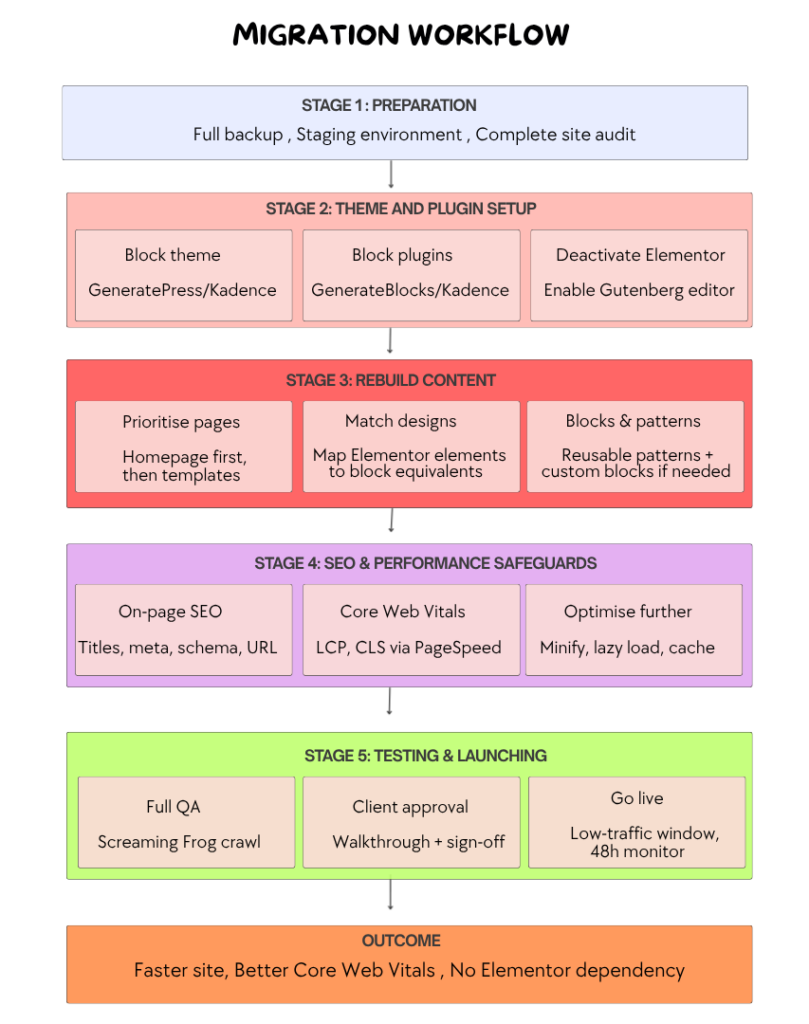
Before we get into each stage, here’s the full migration workflow we follow at a glance, so you know exactly where you are at every point in the process.
You don’t have to get this right on your own.
We’ve migrated dozens of sites from Elementor to Gutenberg. Zero downtime, Zero SEO loss. Hand us yours, we’ll handle the rest.
Let Our Team Handle Your Migration
Now let’s break down what each stage involves.
STAGE 1: PREPARATION STAGE
- Back up: This marks the beginning of a conversion. We start with a full website backup (database, themes, plugins, media files etc.) using a plugin like UpdraftPlus and test the restore process on a local environment to ensure your data can be safely recovered if any issues occur during the conversion.
- Staging: Set up a staging environment or clone the site to a subdomain to safely test changes without affecting the live website. We use this staging site for QA testing, SEO validation, performance checks, and final client review before going live.
- Audit: We perform a complete audit of pages, templates, forms, and key website functionality prior to conversion.
STAGE 2: THEME AND PLUGIN SETUP
- Choose a block theme: Generally we use lightweight, Gutenberg-friendly themes like GeneratePress or Kadence to ensure fast performance, clean code, and full compatibility with the block editor.
- Add block plugins if needed: Install tools like GenerateBlocks or Kadence Blocks to extend Gutenberg’s design capabilities, enabling advanced layouts such as testimonials, grids, hero sections, and reusable patterns without heavy page builders.
- Deactivate Elementor & enable Gutenberg setup: We then disable Elementor once the foundation is ready, and ensure Gutenberg is fully configured as the primary editor. This helps us streamline performance and prepare the site for block-based rebuilding.
The real challenge in large-scale Elementor migrations isn’t rebuilding pages, it’s maintaining consistency throughout the process. Rebuilding five pages manually is manageable. Rebuilding fifty the same way, with the same fidelity and zero regressions, is a different challenge entirely.
That’s why we developed an internal automation layer that runs in parallel with stages 2 through 5.
Migration Automation Layer
For larger websites, we use our internal helper plugin to manage migrations at scale. It exports Elementor data in a structured format and, using a sample Gutenberg design with an AI-assisted process, generates import files to recreate layouts in blocks. This allows us to migrate similar pages in bulk efficiently and consistently.
The plugin also ensures a controlled switch from Elementor to Gutenberg while preserving original data, with a rollback option available for any page if needed. Once the migration is complete and approved, it performs a cleanup by removing leftover Elementor data, ensuring a leaner database and better long-term site performance.
STAGE 3: REBUILD CONTENT
- Prioritise Pages: We start the rebuild with simple, high-impact pages such as the homepage and about page, followed by other key templates. This helps us validate structure, design consistency, and performance early in the process before moving to more complex pages.
- Match Designs: We then begin translating Elementor layouts into Gutenberg structures. Sections are rebuilt using grouped core blocks, with custom CSS added where spacing, animations, or advanced styling are required. We also ensure full responsiveness across mobile, tablet, and desktop during this stage. As part of this process, we systematically map Elementor elements to Gutenberg equivalents identifying what can be handled by core blocks, what needs block plugins, and what requires custom block development.
- Recreating Designs with Blocks & Patterns: For unique and reusable sections such as hero areas, card grids, testimonials, and feature layouts, we rebuild them as Gutenberg block patterns. This allows us to maintain design consistency while giving the client a reusable layout system inside WordPress. Where core blocks and patterns are not enough, we develop custom blocks for specific needs like dynamic content displays, branded interactions, or complex layouts. These blocks are lightweight, purpose-built, fully integrated with the editor, and free from third-party dependencies, ensuring long-term control and flexibilty
STAGE 4: SEO & PERFORMANCE SAFEGUARDS
- Preserve On-Page SEO: We ensure all on-page SEO elements remain intact during the migration. This includes verifying titles, meta descriptions, schema, and Open Graph data using Rank Math or Yoast SEO. URLs are kept identical wherever possible, and image alt tags are retained. We also verify that page titles render correctly, structured data remains valid, and internal linking is unchanged after the rebuild.
- Check Core Web Vitals: After the rebuild, we test key performance metrics such as LCP, CLS, and other Core Web Vitals using PageSpeed Insights. This helps us confirm that the migration has not negatively impacted site speed or visual stability.
Read More : Learn how to run a complete Google PageSpeed Insights audit and improve Core Web Vitals performance.
- Optimize Further: We further refine performance by minifying CSS and JavaScript, enabling lazy loading for images, and implementing caching using tools like WP Rocket. This ensures the migrated site loads faster and performs more efficiently with a lighter overall structure. We also run a full crawl of the staging site before go-live and compare it with a pre-migration crawl to ensure nothing has changed unexpectedly
STAGE 5: TESTING AND LAUNCHING
- Full QA: We run a comprehensive quality assurance check by comparing the staging site against a pre-migration crawl using tools like Screaming Frog SEO Spider or similar tools. This helps us identify any missing pages, broken links, SEO mismatches, or structural inconsistencies before launch.
- Client Approval:We present the fully rebuilt staging site to the client for review. A walkthrough is conducted to validate design accuracy, functionality, and overall experience. Once approved, we document formal sign-off on design and functionality to confirm readiness for deployment.
- Go Live: We migrate the staging site to the live environment during low-traffic hours to minimize disruption. After deployment, we closely monitor the site for at least 48 hours to ensure stability, performance, and SEO integrity, addressing any unexpected issues immediately.
Outcome After Migration
By following our proven migration workflow, these are the performance and stability improvements typically achieved at scale.
- Page weight reduces significantly as Elementor’s frontend scripts and stylesheets are no longer loaded, resulting in a lighter and faster site.
- Core Web Vitals improve, especially LCP and TBT, due to reduced JavaScript execution and faster rendering.
- The WordPress editor becomes faster and more stable for the client team by using native Gutenberg blocks instead of a page builder layer.
- The site is no longer dependent on Elementor for updates, compatibility, or long-term maintenance, improving overall stability and future readiness.
- This removes a hidden dependency risk and results in a more efficient, performance-focused WordPress setup.
Final Thoughts
With over 11+ years of experience helping companies migrate off Elementor, we have supported hundreds of successful transitions to say with confidence it’s worth doing, but only if you do it properly. Rushing it or skipping stages is where things go wrong, and fixing a poorly executed migration is often harder than doing it right the first time.
The outcome, when the process is followed, is a site that’s faster, cleaner, and no longer tied to a third-party builder’s roadmap. That’s not a small thing. Elementor dependency is a risk that’s easy to ignore until it isn’t.
If your site is still running on Elementor and the migration has been on your radar, the right time to act is before compatibility or performance forces your hand. We’re happy to take a look at what’s involved for your specific setup and give you an honest picture of the work required.

Leave a Reply
Articles
Related Insights.
Blogs and Resources on WordPress, WooCommerce, SEO and Marketing
Leave a
Comment.