
LearnDash LMS Plugin Review: How It Handles Course Creation and Management

Suppose you’re on a path of creating an effective and feature-oriented online learning platform on your WordPress website. In that case, the LearnDash LMS plugin is worth considering, as it converts your existing WordPress website into a fully functional learning management system (LMS).
And adaptable in solving major challenges in learning management systems through its advanced features, user-friendly course builder, and unique engagement tools. It delivers a scalable, engaging learning experience without the hassle of custom development.
Plugin Overview and Compatibility
- Plugin Name: LearnDash LMS
- Category: Learning Management / eLearning
- Compatibility: The plugin requires WordPress 6.6 or higher versions, including 6.7 and 6.8.
- Pricing: The pricing starts at $199 yearly for one site. For further details, visit the official pricing page.
- Active Subscribers: 80,000+
- Ratings & Reviews: As per Trustpilot, the plugin holds a 4.4/5 user rating.
Course Creation
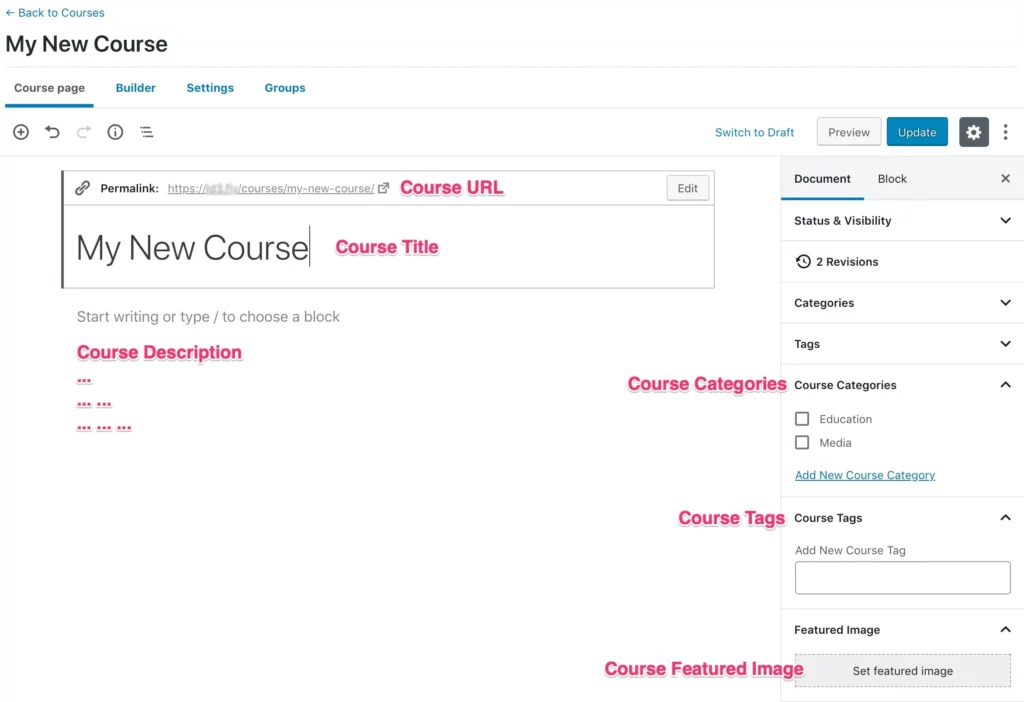
LearnDash is designed in a beginner-friendly way that allows users to easily create courses, especially for WordPress users. The process starts by simply adding the course title in the course editor page, which automatically generates matching course URLs and includes the option to enter a detailed course description in the content box, which provides students a clear summary of what to expect.
The seamless integration with WordPress features allows you to set course categories and tags for improved filtering and structuring. Additionally, it allows you to set a featured image as a visual representation of the course on your website.
The clear and organized interface makes it easier to create learning content for both beginners and experts, just like writing a blog post without any confusion.
Lessons
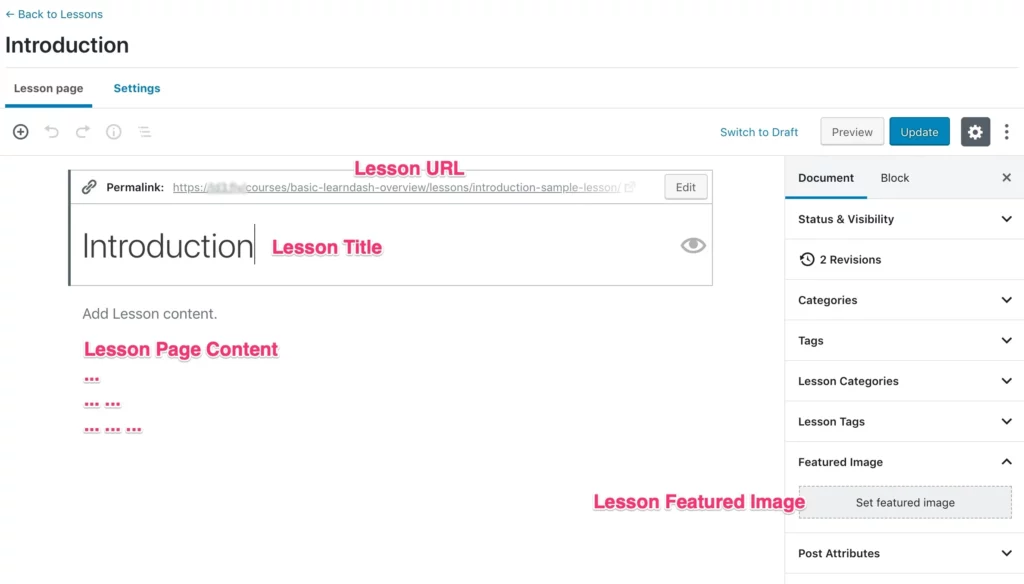
For WordPress users, the plugin follows a natural way. You can create lessons using the well-known WordPress editor, and the platform will automatically produce a URL for the lesson based on the information given.
The main content area offers the option to add content relating to the lesson page, such as videos, block-based elements, images, or texts, and provides instructors complete control to create captivating and multimedia-rich educational programmes.
The right-hand side comes up with the option to access other settings, such as lesson tags and lesson categories, along with the option to set a featured image for better visual representation of the lesson.
This taxonomy and the visual options are important in keeping the content organized and consistent.
Overall, the plugin offers a perfect interface for building lessons and makes the content creation process easier for users without any technical expertise.
Topics
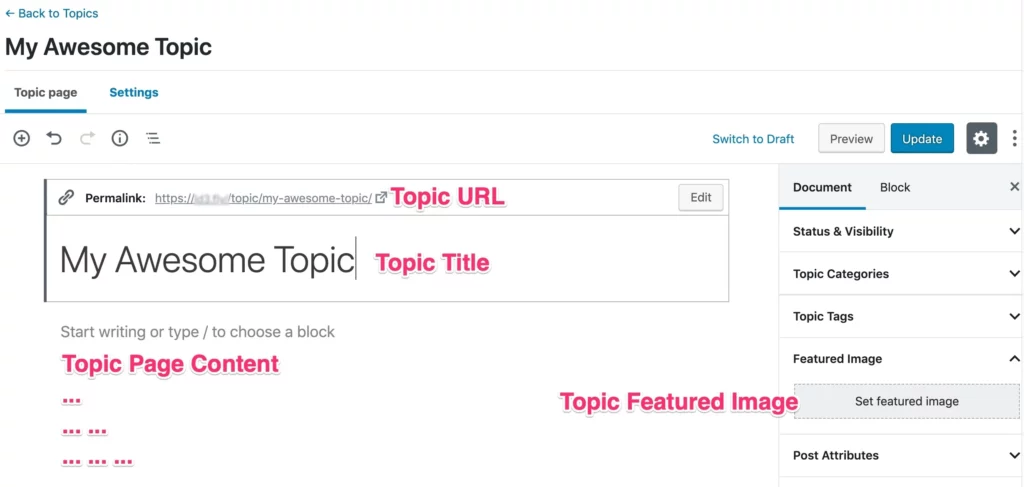
Topics are used to organise lessons into a manageable format. There is no learning curve for course creators, as the topic editor uses the same WordPress interface, which is globally recognized.
It offers complete freedom to organise content according to learners’ requirements. For example, you just enter the topic title, and the platform will automatically generate the topic URL. You can use any kind of block-based elements or plain text to add topic page content.
You can easily access the common WordPress settings, including topic categories, topic tags, and the option to upload a featured image, all of them within the right-hand sidebar. These organized tools keep the content structured and visually engaging at the same time.
The topic feature allows instructors to produce modular content that enhances learning clarity and maintains a consistent framework throughout more complex lessons.
Pricing
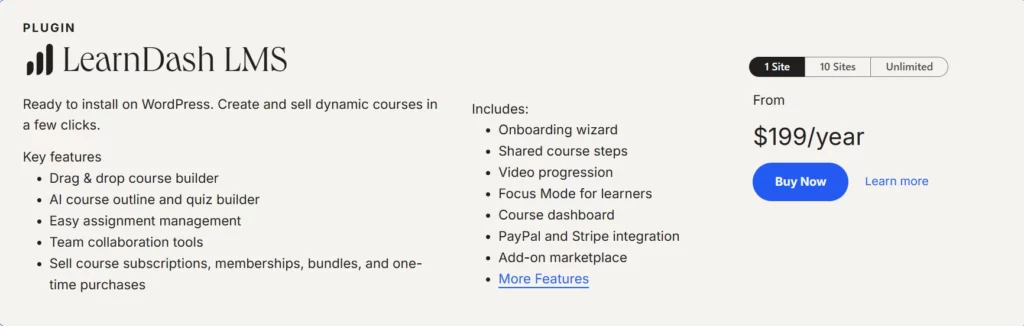
The plugin is available in three main pricing tiers, which are determined by the number of websites you can utilize under each plan.
To know the latest insights about the pricing, visit the plugin’s official pricing page.
Features
- Visual Course Builder: The user-friendly drag-and-drop course builder makes it easier to create and organize captivating courses, including lessons, quizzes, topics, assignments, and videos. No coding expertise is needed; you can arrange the content as you like with this visual interface.
- Timed Content Delivery: The drip-feed scheduling feature ensures that students remain focused and do not feel overwhelmed, as lessons are released gradually at specific time intervals. This approach also plays a crucial role in maintaining a steady learning pace and enhancing knowledge retention.
- In-Depth Progress Tracking: The plugin offers helpful insights on how learners are performing easily through the built-in reporting tools, as it helps in various aspects like quiz scores, time spent on lessons, rate of course completions and many more. These analytics data provide an overview of learning gaps and improvements needed for your content.
- Smart Integrations: The smart integration feature comes up with popular tool integrations such as WooCommerce, PayPal, Stripe, and CRMs.These integrations help simplify the workflow, whether it’s about handling payments or automated emails. Also comes up with the option to expand functionalities further through other third-party tools.
- Multilingual support: Multilingual support offers the courses globally in multiple languages and works seamlessly with popular translation plugins such as TranslatePress, WPML, and Polylang. This allows learners to access content in their preferred language regardless of region.
- Quizzes & Tests: These features is to create dynamic and interactive quizzes to evaluate the learners and come up with features like question banks, exams, and automated grading. Quizzes can also be used for certification purposes.
- Gamification: The gamification feature plays an important role in boosting course participation and completion rates and also encourages healthy competition and motivates learners by awarding certificates, leaderboards, badges, and points.
- Personalized Completion Certificates: Comes up with the option to award learners with professionally branded certificates once after the course completion, along with various customization options, such as the option to add the date, learners’ details, course name, and logos.
- Mobile-Optimized Learning: The plugin comes up with a fully responsive design, making sure that courses automatically adapt to any device regardless of screen size, whether it’s a desktop, smartphone, or tablet, and makes course access much easier for lessons
Pros and Cons
Pros
- No prior coding knowledge required.
- User-friendly interface for both students and creators
- Robust integrations among CRMs, membership plugins, and WooCommerce.
- Regular updates and active communities
Cons
- Paid version only; no free version available.
- A little bit of a learning curve for non-technical users
- Initial stage of plugin setup can be tricky for some users
- Certain third-party add-ons are needed for accessing certain advanced capabilities.
Performance & Optimization Insights
The plugin is fully optimized for speed, and it’s highly compatible with most caching and performance plugins. However, the performance might vary based on the traffic, content, and hosting setup of the platform.
The following are some of the recommendations you can consider:
- Looking to use quality hosting providers like Kinsta or Cloudways
- Use object caching.
- Integrate a CDN for media-heavy courses.
Best Use Cases
- Institutions providing online training and coaching
- Educational institutions
- Corporates offering training programmes
- Creators of membership websites
- Business owners are providing paid courses.
Alternative Plugins
LifterLMS: LifterLMS is one of the highly potential LMS plugins for WordPress, which supports multimedia courses, memberships, and quizzes. It’s ideal for institutions that prioritize supportive community and a modular price structure.
TutorLMS: TutorLMS comes up with a modern interface, and it’s perfect for beginners or relatively smaller institutions who want to establish online courses quickly, along with a handful of opportunities for upgrades.
WP Courseware: If your primary objective is ease of use, then WP Courseware is the right choice because it offers a direct drag-and-drop interface for course creation but lacks some advanced features when compared to other plugins.
Final Thoughts & Recommendation
Learndash is one of the perfect solutions for course developers; it can function as an independent e-learning platform within the WordPress website.
If you are in search of a dependable and feature-rich learning management system, then it’s worth considering, as it’s ideal for course creators who need more control over their e-learning platform.
Download & Learn More
Turn your knowledge into a structured learning system with tools that think like educators.
Start using LearnDash to manage every aspect of your course delivery.

Leave a Reply
Articles
Related Insights.
Blogs and Resources on WordPress, WooCommerce, SEO and Marketing

Leave a
Comment.