Most WordPress migrations fail quietly. The site looks fine on launch day, then two weeks later the rankings drop, images are broken on mobile, and nobody can trace it back to the move. We have inherited enough of these projects to know exactly where things go wrong and more importantly, what it costs to fix them versus what it would've cost to do it right.
Every successful WordPress migration looks simple from the outside. A few exports, a few imports, some plugin recommendations and the site is live. That perception is exactly why so many businesses attempt migrations themselves and exactly why so many run into trouble they didn’t see coming.
As an agency that has handled migrations from Wix, Squarespace, and Webflow to WordPress, multisite consolidations, and complex page builder to Gutenberg conversions, we’ve seen both sides of the process. We’ve also been brought in after failed DIY migrations and that’s where the real lessons emerge. When clients come to us after attempting a migration on their own, the issue is rarely isolated. What began as a cost-saving exercise often turns into a far more complicated and costly situation than a professionally managed migration would have been in the first place.
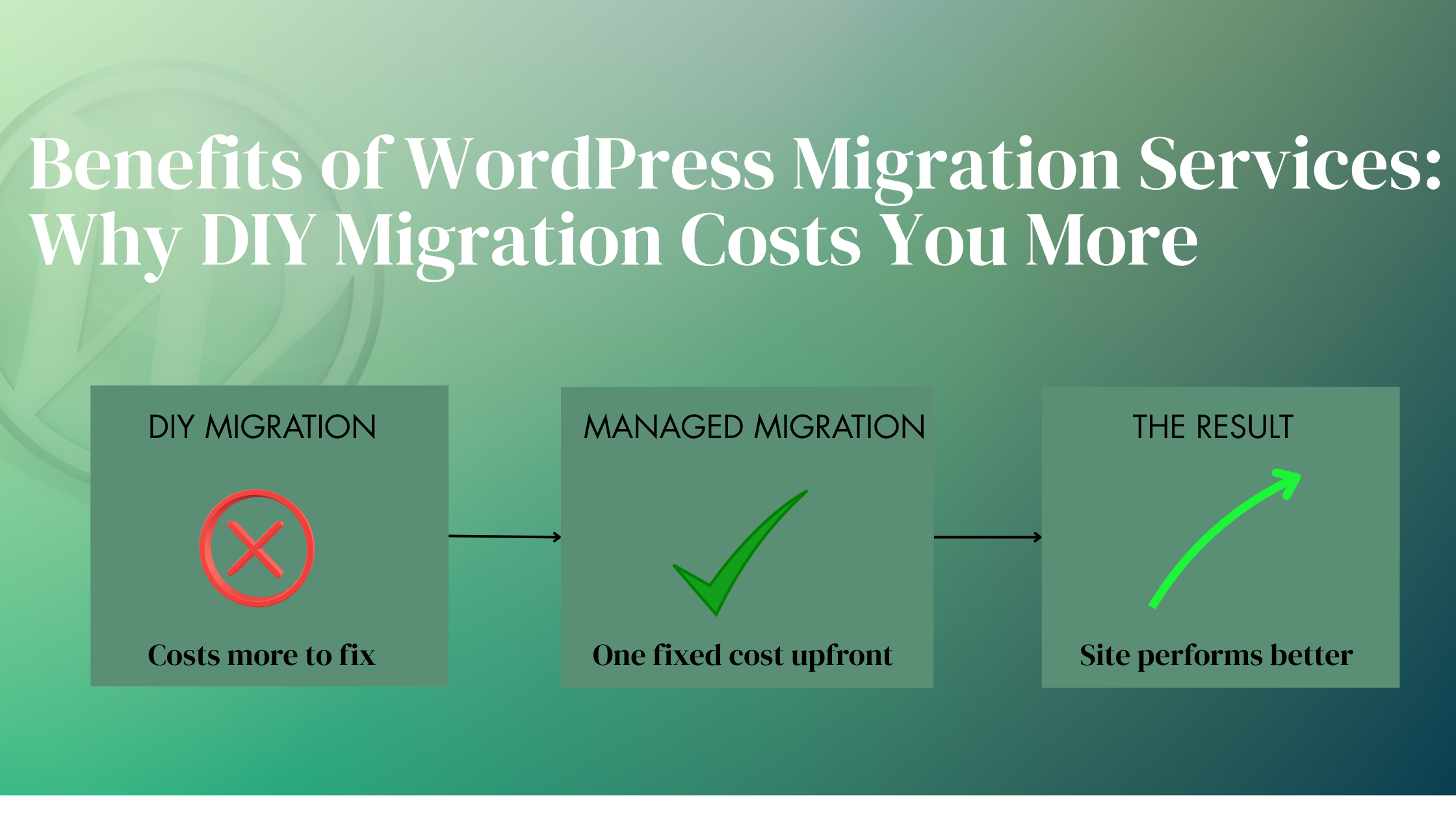
WordPress migration services are not just about moving content from one platform to another. They’re about protecting search visibility, preserving site functionality, minimising operational risk, and ensuring the new website performs better than the old one from day one. The businesses that get this right treat migration as a strategic decision, not a technical task. The ones that don’t often find out why the hard way.
The Technical Failures of DIY Migration
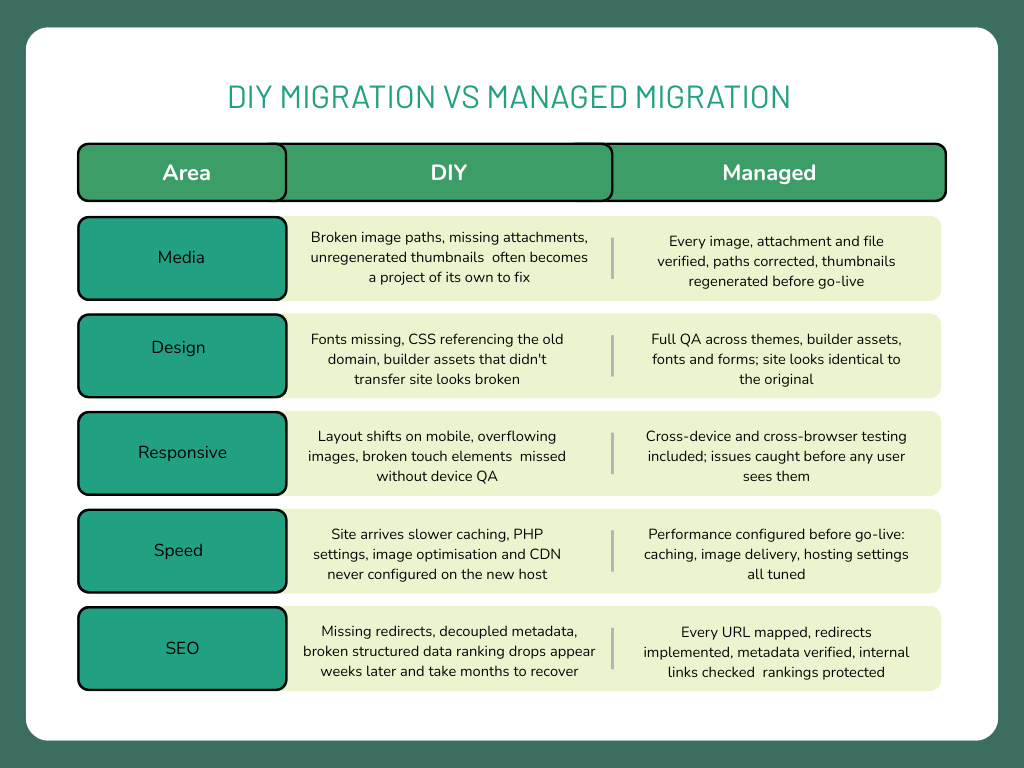
Every failed migration we inherit has problems across multiple areas at once and that’s what makes recovery so difficult. Here’s what typically breaks, and what a managed migration prevents.
Let’s break down why each of these matters
1. Broken Media Libraries and Missing Images
The most common casualty. Migration plugins transfer database content reliably, but media libraries are a different matter. We find broken image paths, missing attachments, incorrectly referenced files, and unregenerated thumbnails on nearly every failed DIY migration we inherit. On content-heavy sites, fixing media alone can become a significant project in its own right.
2. Design Breaks and Layout Inconsistencies
Fonts that don’t load, CSS referencing the old domain, builder-specific assets that didn’t transfer, the site can look dramatically different on the new host even when the content is technically all there.
3. Mobile and Responsive Display Issues
Easy to miss on a desktop during a quick check. We regularly find layout shifts on mobile, images overflowing their containers, and touch elements that stop working. These don’t get caught without thorough cross-device QA, which DIY migrations rarely include.
4. Performance Drops After Migration
Performance almost always suffers. Without proper configuration on the new host caching, PHP settings, image optimisation, CDN setup, the site arrives slower than it left. The new environment was simply never set up correctly, and that overhead falls on you to resolve after the fact.
5. Long-Term SEO and Traffic Damage
Improper redirect mapping creates duplicate content. Meta titles and descriptions can decouple from their pages. Structured data breaks silently. Internal links referencing the old domain stop working. None of this is immediately obvious, it surfaces weeks later as a ranking decline that’s hard to trace back to the migration. And if URLs weren’t mapped correctly from the start, recovering those rankings often means additional SEO work and link-building on top of the technical fix.
Each of these failures has a direct counterpart in what a managed migration actively prevents.
Benefits of Professional WordPress Migration Services
A professionally managed WordPress migration does not just move a site, it protects the entire business behind it. Here are the direct benefits:
Minimal or Zero Downtime : We handle migrations in staging environments and schedule go-live during controlled windows, ensuring the live site remains stable and accessible throughout the process.
SEO and Traffic Protection : We preserve existing URL structures, implement proper redirects, verify metadata, and audit internal links to protect rankings and avoid unnecessary traffic loss after migration.
Accurate Content and Media Transfer : Every page, image, attachment, and database element is migrated, validated, and properly referenced to ensure nothing is lost or broken during the transition.
Design and Functionality Preservation : We verify layouts, themes, builder assets, forms, and interactive elements after migration so the website looks and functions exactly as intended across devices and browsers.
Faster and More Reliable Execution : Having handled migrations from platforms like Wix, Squarespace, Webflow, multisite environments, and page builder to Gutenberg conversions, we use proven workflows that reduce delays and avoid manual errors.
Support for Complex Website Architectures : Custom themes, large databases, multilingual websites, multisite networks, advanced plugin ecosystems, and builder-specific structures require careful handling especially during migrations where small mistakes can create major issues later.
Improved Performance on the New Environment : Migration is also an opportunity to optimise the website. We configure caching, optimise media delivery, review hosting settings, and ensure the new environment performs better than the old one.
Backup, Rollback, and Recovery Protection : We maintain clean backups and rollback capability throughout the migration process, ensuring there is always a safe recovery path if unexpected issues appear during launch.
Post-Migration Validation and Monitoring : The migration process does not end at launch. We monitor for crawl issues, broken links, performance regressions, and unexpected behaviour to ensure problems are identified before they affect users or rankings.
Lower Long-Term Cost and Risk : A properly managed migration reduces operational risk, avoids expensive recovery work, and allows your team to stay focused on core business activities instead of technical troubleshooting.
Why DIY migration costs more than you expect
The appeal of a DIY migration is straightforward, no agency fee, no external dependency, just move the site yourself. On paper, the saving looks real. In practice, the costs simply shift from one column to another, and they’re rarely smaller.
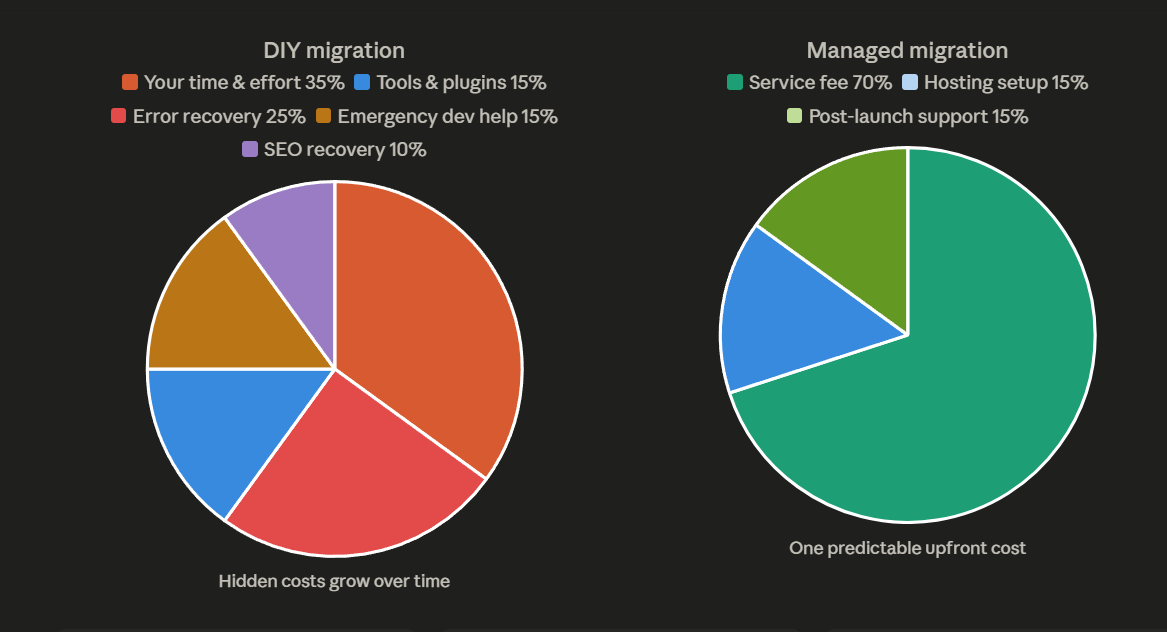
Here’s where your budget actually goes.
Your time has a price
What looks like a simple weekend migration regularly turns into 20–40 hours of research, plugin setup, troubleshooting, redirects, host configuration, and QA. Even at a modest $50/hour opportunity cost, that’s already $1,000–$2,000 in lost time before anything actually breaks. For business owners and in-house teams, that hidden cost is rarely considered at the start, but it becomes very real by the end.
Plugins and tools aren’t free either
A proper DIY migration still requires paid tools migration plugins, staging environments, SEO audit software, redirect managers. These costs are small individually but add up, and they don’t come with the expertise to use them correctly.
Mistakes get expensive fast
A single missed redirect can quietly drain organic traffic for months. A misconfigured hosting environment slows the site down from day one. An incomplete media transfer means broken images across dozens of pages. Each of these is fixable but fixing them means either your time or a developer’s, neither of which is free.
For example, if a site receiving 5,000 organic visits per month loses just 30% of that traffic for three months, that’s around 4,500 visits lost. With a 2% conversion rate and an average order value of $200, that one preventable issue alone can result in roughly $18,000 in lost revenue.
When things go wrong, you pay emergency rates
DIY migrations that hit serious problems corrupted data, broken ecommerce flows, major ranking drops almost always end up with a developer being brought in under time pressure, on an unclear scope, often at higher rates than a planned engagement would have cost.
The managed alternative isn’t just cheaper in hindsight it’s predictable
A professionally managed migration has one fixed cost agreed upfront. There are no surprise recovery bills, no downtime losses, no SEO cleanup work to fund afterwards. The fee you see is the fee you pay.
What a Failed Migration Actually Costs Your Business
You didn’t build your business overnight.
Every product listing, every customer record, every piece of content, every setting configured just right, that’s years of work, late nights, and money reinvested back into something you own. Your website isn’t just a website. It’s the front door to your revenue.
A failed migration can take all of that down in hours.These aren’t hypothetical warnings. Every pattern below comes from real clients people who invested real money, real time, and real energy building their businesses online. What happened next was entirely avoidable.
1. A Broken Site Costs You Customers You’ll Never Get Back.
When your site goes down mid-migration the damage doesn’t wait for you to fix it.
Every hour it’s down, customers who found you are leaving and not coming back. They’re going to a competitor whose site works. Your Google rankings are taking a hit. Your credibility is taking a hit. And you’re sitting in the middle of it all, under enormous pressure, trying to reach someone who can fix it fast which is exactly when mistakes compound and costs spike.
Urgency is the most expensive condition a business can be in. Rushed recovery work takes longer, costs more, and leaves more room for things to go wrong again. What started as an attempt to move faster ends in a crisis that takes far longer to resolve than a proper migration ever would have.
The real question isn’t whether you can afford a managed migration. It’s whether you can afford what happens if you don’t get one. Your revenue, your data, your reputation, your customer relationships all of it runs through your website. Protecting that isn’t an expense. It’s the most important investment you make in everything you have already built.
2. You Try to Save Money. You End Up Paying More – Twice.
You attempt the migration yourself. Something breaks. Now you need a developer anyway, except instead of a clean planned job, they’re walking into a mess. You pay twice: once for the attempt, and again to fix it. And in between, your business ran on a fragile, half-broken site that cost you sleep, focus, and customer trust even if none of that ever showed up on an invoice
Here’s the number that stings: emergency recovery work typically runs 40–60% more than a planned migration. A job that should have cost $1,500 becomes a $2,500 rescue operation. The money you tried to save becomes the premium you end up paying under worse conditions, with more at stake.
3. YourData Can Be Damaged Beyond Recovery.
This is the one that keeps us up at night and it should concern you too.
A plugin that crashes mid-process. A partial database import. A file transfer that overwrites your content without finishing. Any of these can corrupt not just the destination but your original site data. The source. The master copy.
When that happens, there is no “just roll it back.” There’s no clean version to restore. What we inherit at that point isn’t a healthy site waiting to be moved it’s a damaged one that needs to be partially reconstructed before migration can even begin. That’s extra time, extra cost. And in the worst cases, content and data that simply cannot be recovered.
Years of work. Gone because of a migration that went wrong.
Three Reasons a Bad Migration Costs More to Fix Than to Prevent
We understand the hesitation agency fees are a real cost, and the DIY option looks straightforward on paper. But when clients ask us to justify a managed migration, the answer usually comes down to three things, and none of them are about our fee.
Recovery vs. Prevention: Fixing a broken migration is almost always more expensive than doing it right the first time. Recovery means working backwards from an unknown state. The unpredictability alone drives cost up.
Downtime Has a Direct Business Cost: Every hour a site is down or degraded is lost traffic, lost leads, and lost revenue. For e-commerce sites this is immediate and measurable. A professionally managed migration done on staging, verified before go-live, switched over in a controlled window eliminates unplanned downtime entirely.
SEO Recovery Takes Time That Cannot Be Bought Back: Google typically recrawls mid-sized sites every 2- 4 weeks, but recovery from a botched migration is not immediate. After structural issues, search engines need time to recrawl, reindex, and reassess the site, a process that can take anywhere from 3- 6 months depending on the site’s authority and the severity of the problems. During this period, ranking drops don’t just pause. They compound daily in lost organic traffic, and no amount of post-fix spending can speed up how search engines rebuild trust.
What a Planned, Managed Migration Actually Includes
Here is what our migration process covers the steps that prevent every problem described above:
Full pre-migration audit of content, media, plugins, and SEO data
Staging environment setup and complete migration dry-run before any live changes
Redirect mapping for every URL that changes during the migration
SEO metadata verification post-migration using pre-migration crawl comparison
Cross-device and cross-browser QA on the migrated site
Performance configuration on the new host before go-live
Controlled go-live with rollback capability if anything unexpected surfaces
Post-migration monitoring for crawl errors, ranking shifts, and broken links
None of these steps are optional. Each one addresses a category of failure we have seen DIY migrations produce. Together, they represent the difference between a migration that is genuinely complete and one that merely appears finished until something breaks.
Bottom Line
A WordPress migration is not just a technical task it’s a business decision. Every element of your site, its traffic, its rankings, its revenue, has been built over time. A migration done well protects all of it. A migration done poorly puts it at risk in ways that aren’t always visible until the damage is already done.
The businesses that come to us after a failed DIY attempt rarely regret hiring help they regret not doing it sooner. If your site is straightforward, a DIY approach may serve you fine. But if there’s any complexity involved custom content, ecommerce, SEO history, multilingual setups the cost of getting it wrong far outweighs the cost of getting it right the first time.
We’ve handled migrations across every major platform and complexity level. Our process is built around one goal: your site arrives on WordPress performing better than it left, with nothing lost along the way.


Leave a
Comment.