
WPML Plugin Review: Translate Your WordPress Website with Ease

Translating your WordPress website doesn’t have to be complicated, especially with the right plugin. WPML (WordPress Multilingual Plugin) offers a powerful yet simple way to manage multiple languages on your site. You can translate content with ease and reach people worldwide without getting lost in technical details.
With strong features, intuitive workflows, and wide plugin and theme support, WPML remains a reliable tool for anyone building multilingual websites. To learn more, explore the full plugin review in this article, and see whether WPML is the right fit for your business or possibly even a better choice compared to others.
Compatibility and Performance Overview
- Plugin Name: WPML
- Category: Multilingual, Translation
- Compatibility: WPML supports WordPress versions 4.7 and higher, requires PHP 7.0+, and is fully compatible with MySQL 5.6+ or MariaDB 10.1+, delivering optimal performance across modern hosting setups.
- Pricing: Basic plan starts at €39
- Installations: More than 1,000,000
WPML Dashboard overview
The WPML plugin dashboard provides you with key settings for effective translation. The translation dashboard displays the current translation status, the Translators tab allows you to manage translators and their permissions, and the translation tools offer the necessary tools for effective translation. Overall, these options guarantee excellent multilingual content and simplify the translation process.
1. Translation Dashboard
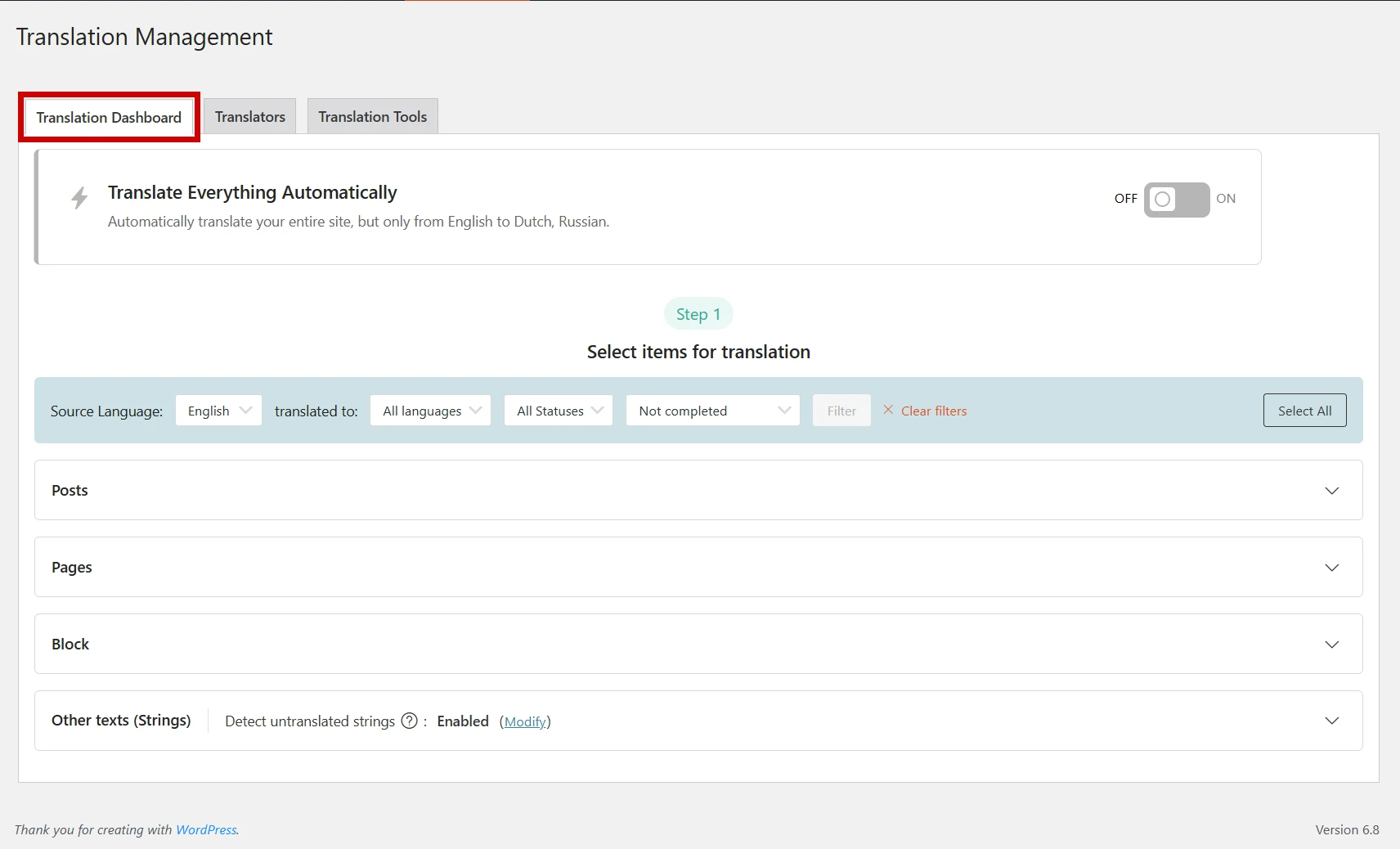
The Translation Dashboard is a central hub for managing your website’s entire translation process. By enabling the auto-translation feature, you can automatically translate your site into over 65 available language pairs. Additionally, you have the flexibility to add custom languages beyond the default options, offering broader multilingual support tailored to your needs.
You can also manually select specific elements—such as posts, pages, or block content—for translation, giving you full control over what gets translated. The dashboard includes various filters to help organize content based on source language, target language, translation status, and completion status, streamlining the process.
It also detects untranslated strings automatically, ensuring no important content is overlooked. This structured and user-friendly layout promotes consistency and supports full site localization.
2. Translators
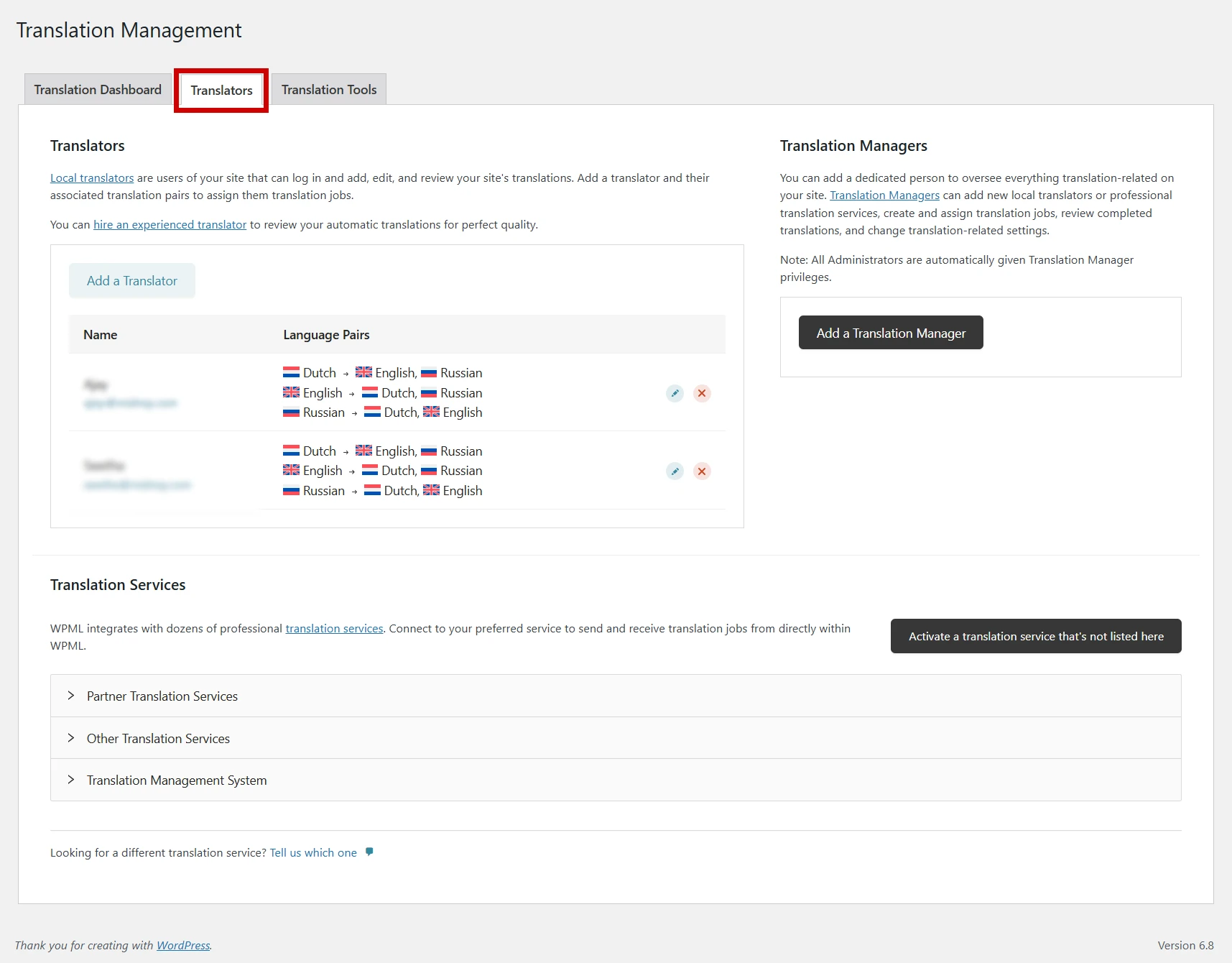
The Translators section lets you control who can contribute to your site’s translations. To manage the translation scope, you can assign local translator users who can log in, modify, and review translations for specific language pairs. This configuration supports the efficient allocation and streamlining of translation tasks.
For more accurate and polished translations, the section also provides the option to engage qualified professional translators.
On the right, the Translation Managers panel lets you assign a dedicated person to oversee all translation activities, manage translators, create and assign jobs, and review completed work. By default, all administrators have translation manager privileges.
The section also highlights Translation Services, enabling easy integration with dozens of professional translation providers. You can connect to a preferred service or activate one that’s not listed, ensuring a flexible and comprehensive translation management system.
3. Translation Tools
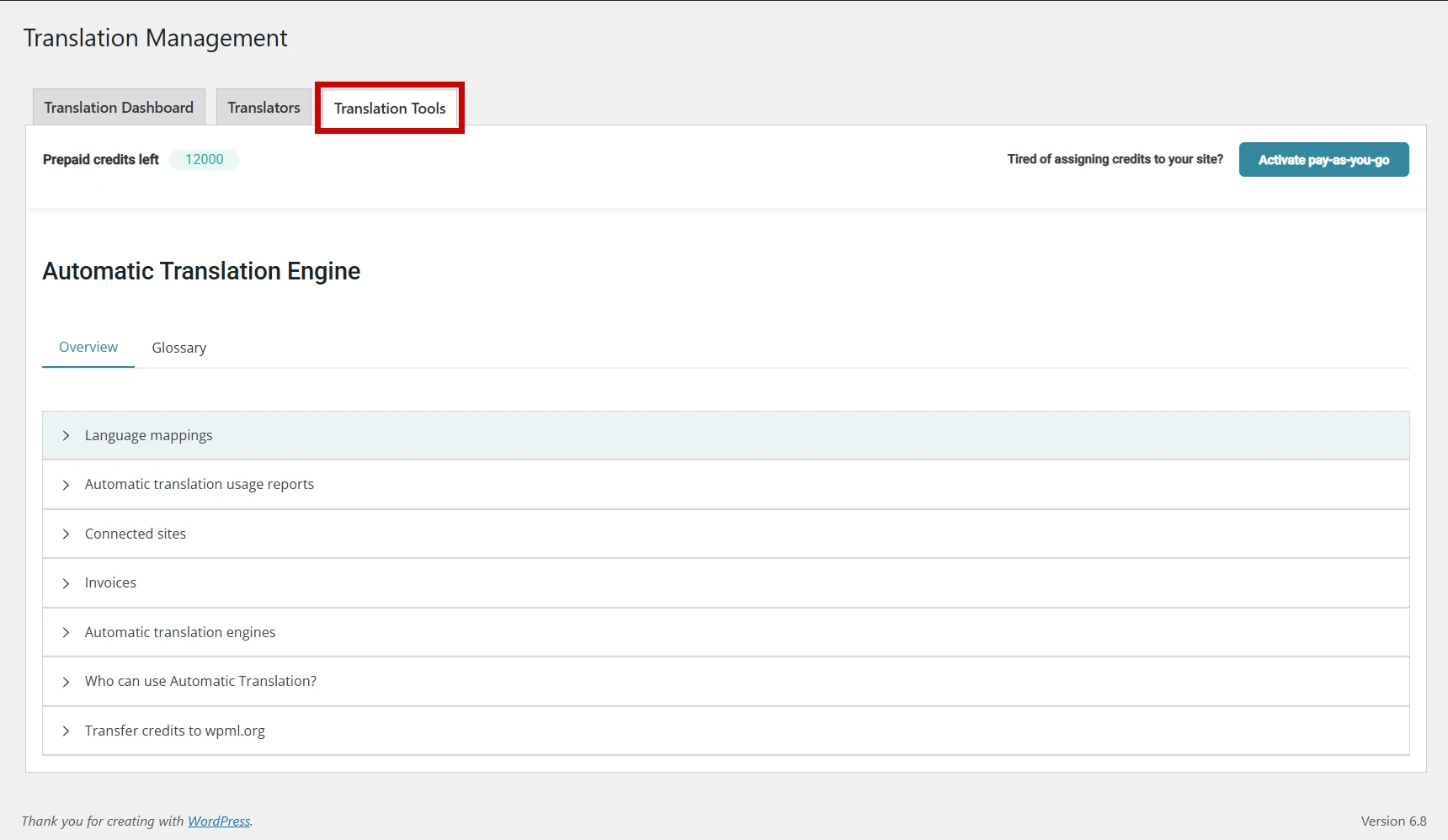
The Translation Tools section is designed to manage and optimize the plugin’s automatic translation engine. It provides users with a detailed overview and access to important settings such as language mappings, automatic translation usage reports, connected sites, invoices, and the available automatic translation engines.
Additionally, users can view who is authorized to use automatic translation and have the option to transfer translation credits to WPML.org if needed. This level of access ensures transparency and ease of control over who uses what resources.
At the top, it displays the number of prepaid credits left and offers the choice to activate a pay-as-you-go model, making it easier to manage translation costs dynamically.
This section ensures that automatic translations are handled efficiently, giving users full control over how credits are used and how translations are processed across connected websites.
Front-End View: Language Switching in Action
Below is a visual representation of how the front-end of your website appears when using WPML plugin. The first screenshot shows the default English version of the website. The second screenshot displays the same page after switching to French, one of the 65+ languages available for translation, demonstrating how WPML smoothly delivers the translated content without affecting the site’s design or structure. WPML makes it easy to deliver a multilingual experience by translating your content into multiple languages for a global audience.
Front-End View in English
Front-End View After Switching to French
Essential Features to Look For
- Manage Multiple Languages Within One WordPress Site: You don’t need separate sites for different languages—this plugin lets you create and manage content in multiple languages from a single WordPress installation. It simplifies the entire process, keeping everything organized in one place.
- Custom Translation Options That Fit Your Needs: Whether you prefer translating content manually, using automatic tools, or assigning specific tasks to team members, this plugin gives you the flexibility to pick the method that integrates seamlessly with your workflow.
- Quality Automatic Translations: Automatic translation is powered by trusted AI engines like Google Translate, DeepL, and Microsoft Translator. You can expect fast, fairly accurate translations with the option to review and improve them as needed.
- Controls Translation Workflow: Managing translations across a large site can get complex, but this tool allows you to assign roles, track progress, and control who does what—all from a central dashboard that keeps things running smoothly.
- Professional Human Translation: If you want high-quality, human-reviewed content, you can connect your site with professional translation services or assign the work to your translators within the system.
- Multilingual & Multicurrency E-Commerce: If you’re running a WooCommerce store, this plugin makes it easy to show your products in different languages and offer multiple currencies. You can even set rules for switching currencies based on the visitor’s location.
- String-Based Content Translation: It’s not just pages and posts—this feature lets you translate theme texts, plugin messages, widget content, and other strings that usually sit in the background but are crucial for a complete multilingual experience.
- Multi-Lingual SEO Optimization: To help your translated content perform well in search engines, the plugin supports multilingual SEO practices. You can translate meta titles, descriptions, and slugs, and even use it alongside popular SEO plugins like Yoast or Rank Math.
- Quick and Effective: Despite all the powerful features, the plugin is optimized for performance. It’s designed to minimize load time and keep your multilingual site running fast and smoothly.
- Stable and Secure: It’s regularly updated for compatibility with the latest versions of WordPress and other plugins. Security and long-term stability are clear priorities in its development.
- Compatible with Most WordPress Themes and Plugins: You don’t have to worry about compatibility issues—it works well with a wide range of WordPress themes and plugins, making integration simple and reliable.
- Dependable Support and Continuous Improvement: If you ever need help, there’s a responsive support team available. The plugin is also actively developed, with frequent updates and improvements based on user feedback.
Pricing
WPML is a premium multilingual plugin with pricing starting at €39/year under the Multilingual Blog plan. This entry-level package supports 1 production site and up to 3 development sites, making it a suitable choice for bloggers and small websites that need manual translation for posts, pages, and menus.
You can explore the different pricing packages and choose the one that best fits your website’s translation needs.
Pros and Cons
Pros
- User-friendly interface for translating every type of content effortlessly.
- Seamless WooCommerce integration for multilingual online stores.
- Great support for translating theme and plugin texts seamlessly.
- Regular updates and strong community support.
Cons
- Requires a premium subscription for advanced features.
- Setup can be complex for users who are not familiar with multilingual site management.
- Translation of some content may need manual adjustments.
Performance and Optimization Overview
WPML is a feature-rich plugin, but as with any translation plugin, it can slightly impact site performance, especially on large websites with multiple languages.
- Speed Improvements: WPML doesn’t drastically slow down websites, but the more languages and content you add, the more resources are needed.
- Optimization Tips: Use WPML’s caching and performance settings to optimize translation jobs, minimizing server overload and improving efficiency.
Top Use Cases
- Agencies: A perfect choice for agencies managing multilingual websites for their clients.
- E-commerce Sites: Perfect for WooCommerce stores needing to cater to international customers.
- Content Creators & Bloggers: If you’re creating a blog or content-based site aimed at a global audience, WPML makes translation simple and manageable.
Other Recommended Plugins
Polylang Pro: Polylang Pro is a powerful WordPress plugin that enables effortless creation and management of multilingual websites. It allows you to translate posts, pages, and custom content, offers smooth language switching, integrates seamlessly with SEO plugins, and features an intuitive interface, making it ideal for both beginners and advanced users.
Weglot: Weglot is a user-friendly website translation plugin that automatically translates your content into over 110 languages without the need for coding, utilizing advanced machine translation services. With its intuitive dashboard, you can easily edit translations, manage multilingual SEO, and collaborate with your team, making it perfect for building multilingual websites
TranslatePress: TranslatePress streamlines the translation process for your WordPress site by enabling front-end management with an intuitive, user-friendly interface. It supports both automatic and manual translations, and is fully compatible with WooCommerce and SEO plugins.
Conclusion & Recommendation
WPML is a powerful, all-in-one solution for creating a multilingual WordPress website. Its broad compatibility, excellent translation management features, and strong support for WooCommerce make it a top choice for e-commerce sites, agencies, and content-heavy websites.
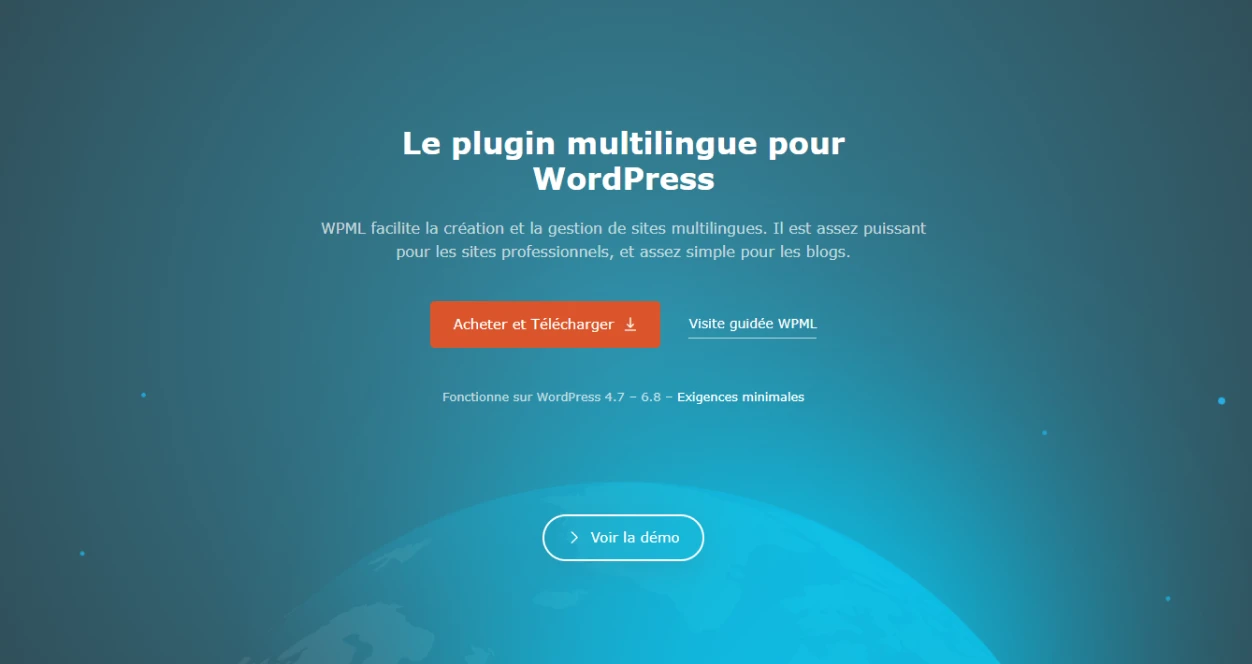
You can explore more about WPML and get started directly from the official website.
If you’re looking for a scalable solution for multilingual websites, WPML is well worth the investment, especially if you’re managing more than one language.

Leave a Reply
Articles
Related Insights.
Blogs and Resources on WordPress, WooCommerce, SEO and Marketing

Leave a
Comment.